When you click on links to various merchants on this site and make a purchase, this can result in this site earning a commission. Affiliate programs and affiliations include, but are not limited to, the eBay Partner Network. When you click on links to various merchants on this site and make a purchase, this can result in this site earning a commission. Affiliate programs and affiliations include, but are not limited to, the eBay Partner Network.
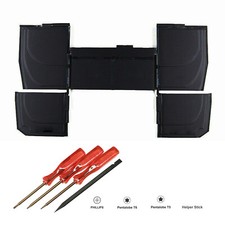
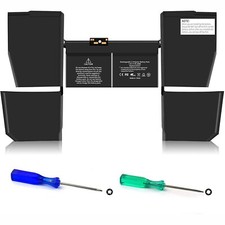
About this item - 【Compatible Part Number】A1527 , A1705 , A1534 , A1534(EMC 2991) , A1534(EMC 2746) , A1534(EMC 3099).
- 【Check Your Model】 Only fit for MacBook 12-Inch (Model A1534, Release 2017 2016 2015) with Retina Display MF855LL/A MK4M2CH/A MF855CH/A MF865CH/A MF865LL/A MJY42CH/A MLH72LL/A, MLH82LL/A, MLHA2LL/A, MLHC2LL/A, MLHE2LL/A, MLHF2LL/A, MMGL2LL/A, MMGM2LL/A, MNYG2LL/A, MNYH2LL/A, MNYJ2LL/A, MNYK2LL/A, MNYL2LL/A, MNYM2LL/A, MNYN2LL/A, MNYF2LL/A, MJY32LL/A, MK4M2LL/A, MK4N2LL/A. Please kindly check the model number at the bottom of your laptop (A****).
- 【Promise】Everyone of our replacement batteries has tested with strict quality control standards to ensure the true capacity, stable current and low self-discharge. All ANTIEE batteries are UL / CE / FCC / RoHS Certified for safety, we are confident in the performance of the replacement battery.
Get going with longer battery life and improved laptop performance with this MacBook A1705 Battery. This high quality rechargeable MacBook A1705 Battery is designed with the highest control standards; have internal circuit boards with smart chips ( Cell imbalance shut off protection, Thermal runaway protecton, Overcharges shut off protection, Over discharge shut off protection, High/low temperature shut off protection), and are made from quality materials without lead or mercury. Every MacBook laptop battery has been Certified by CE, UL, ROHS, IO9001/9002 and has passed strict safety tests. Long lasting, this extended 6 cells MacBook A1705 Battery can be charged/discharged for more than 600-800 cycles. Replace Part Number: - MacBook 12-Inch Retina (Model A1534, Release 2017 2016 2015)
MacBook 12-Inch A1534 (Early 2015) Series: - Release 2015: MK4M2LL/A, MJY32LL/A, MF855LL/A, MK4N2LL/A, MJY42LL/A, MF865LL/A.
MacBook 12-Inch A1534 (Early 2016) Series: - Release 2016: MLHA2LL/A, MLHC2LL/A, MLH72LL/A, MLH82LL/A, MLHE2LL/A, MLHF2LL/A, MMGL2LL/A, MMGM2LL/A.
MacBook 12-Inch A1534 (Mid 2017) Series: - Release 2017: MNYG2LL/A, MNYF2LL/A, MNYH2LL/A, MNYJ2LL/A, MNYK2LL/A, MNYL2LL/A, MNYM2LL/A, MNYN2LL/A.
How to Find Your MacBook Model?- Find the model number printed on the bottom of the MacBook next to the regulatory mark. It can also be found next to the barcode label on the original packaging.
- Open your MacBook and click the Apple menu in the upper left corner, click "About This Mac" and you will see the model, size, and release year, such as "Macbook, Retina, 12-inch, Early 2015".
- The original packaging may show an Apple part number, such as MK4M2xx/A ("xx" is a variable, which varies by country or region). You can find the entry that matches this Apple part number in the DESCRIPTIONS to find your model.
- Please do not bend the battery pack and avoid fire sources, otherwise it may short circuit and explode.
Skills For Installing A New Battery:- No instructions. We recommend that you search for the battery removal tutorial from Google. It is best to check the tutorial before DIY to avoid unnecessary losses during the disassembly process.
- Please do not bend the battery pack and avoid fire sources, otherwise it may short circuit and explode.
- Before disassembling your laptop, put the old battery charge below 25%. If a fully charged lithium battery is accidentally punctured, it will have serious consequences.
- Please keep every screw you removed.
- Make sure that interface is correctly connected to its socket.
- Please protect your screen and touchpad.
Laptop Battery Instructions:- After installing the new battery, we recommend that you plug in the power adapter to activate the new battery to boot your MacBook.
- Then discharge the new battery to 10% (not 0%), then charge to 100%, cycle 3-5 times to wake up the new battery.
- Plug in the power adapter for a long time, please perform a complete discharge and charge process on the battery at least once a month.
- Charge it to around 50% when you store it long term.
- Please feel welcomed to notify us of any inconvenience or fault in our battery.
Usual Troubleshooting Methords:Why the laptop does not recognize the battery or the laptop does not display the battery? - Could be caused by battery loose. Please re-install the battery and make sure that the battery cable and the motherboard interface are tightly inserted.
- May be due to conductive material damaged which the laptop motherboard and battery anode and cathode contact position, you can try to confirm it with your original battery.
- Please feel welcomed to notify us of any inconvenience or fault in our battery.
Notice:
1、If you can give us positive response as soon as you receive the goods, we would be very grateful.
2、Because your response is very important to the development of our business. If you are satisfied with our products and services, we sincerely invite you to leave us positive response.
3、If you are not satisfied, you really want to leave us negative response, please wait a moment, please contact us first, we will definitely solve your problem and make you satisfied.
4、Even if something is beyond our control, we will do our best to solve it. We don't want to give you a bad buying experience.
Returns:
1、30 days warranty from the purchased date. Please contact us via email before returning the defective item.
2、Our warranty does not extended to any product that are physically damaged or that are not under normal operating conditions as result of misuse or improper installation on the buyer/user's part.
3、Return items should include the original packaging and all accessories. buyers MUST contact us for the returning address.
4、In all cases, buyers pay shipping fees at their own cost to return products for exchange or refund. We will be responsible for the postage of replacements. Refund will be made upon receipt of the returned item.
Please make a note in a paper with your User ID, purchased date and details of the issue you are experiencing.

|
|