When you click on links to various merchants on this site and make a purchase, this can result in this site earning a commission. Affiliate programs and affiliations include, but are not limited to, the eBay Partner Network. When you click on links to various merchants on this site and make a purchase, this can result in this site earning a commission. Affiliate programs and affiliations include, but are not limited to, the eBay Partner Network.
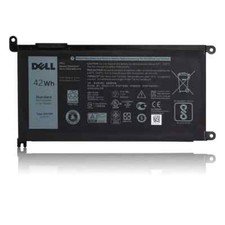
Product Overview: Restore your laptop's mobility with this 100% Genuine Original Dell 42Wh 3-Cell Battery. Specifically engineered for the Dell Inspiron and Vostro series, this OEM battery ensures stable power delivery, accurate health reporting, and safe charging for your daily computing needs. Core Specifications: Battery Type: 3-Cell Rechargeable Li-ion Polymer - Capacity: 42 WHr
- Voltage: 11.4V
- Part Number (DP/N): WDX0R, 0WDX0R, 3CRH3, T2JX4, Y3F7Y, FC92N
- Condition: 100% Genuine Dell Original (OEM)
- Warranty: 1-Year Seller Warranty
Compatibility List: This battery is strictly designed for the following Dell models: Dell Inspiron 14 7000 Series (燃7000): 14-7460, 14-7472, 14-7368, 14-7378 - Dell Inspiron 15 7000 Series (燃7000): 15-7560, 15-7569, 15-7572, 15-7579
- Dell Inspiron 13 5000 Series: 13-5368, 13-5378
- Dell Inspiron 15 5000 Series: 15-5565, 15-5567, 15-5578
- Dell Vostro: Vostro 5468, Vostro 5568
- Dell Latitude: Latitude 3480
(Note: This 42Wh battery is NOT compatible with high-performance gaming laptops like the Dell G series or Alienware, which require 74Wh+ batteries. Please verify your exact model before purchasing.) ⚠️ Key Buying & Usage Tips (Please Read Before Purchase): Verify Your Model: Check the bottom label of your laptop or enter your Service Tag on Dell's support site to confirm compatibility. - Why Choose Genuine Dell? Dell OEM batteries include a built-in BMS (Battery Management System) that integrates with the motherboard for intelligent power management, over-voltage/temperature protection, and accurate health reporting in BIOS/Dell Power Manager. Third-party batteries often lack these safeguards and may trigger BIOS errors.
- Installation Note: This is an internal battery. Please ensure you have the correct screwdriver and carefully disconnect the battery cable from the motherboard before removal.
- Battery Health: Use Dell Power Manager to check cycle count and health status before replacing. If your battery is swelling, stop using it immediately and dispose of it properly.
100% Satisfaction Guarantee: If you are unsure about compatibility or need help identifying your laptop model, please message us before purchasing. We are always here to help!  |
|