Digital download codes delivered ASAP via email upon payment.
What's included:
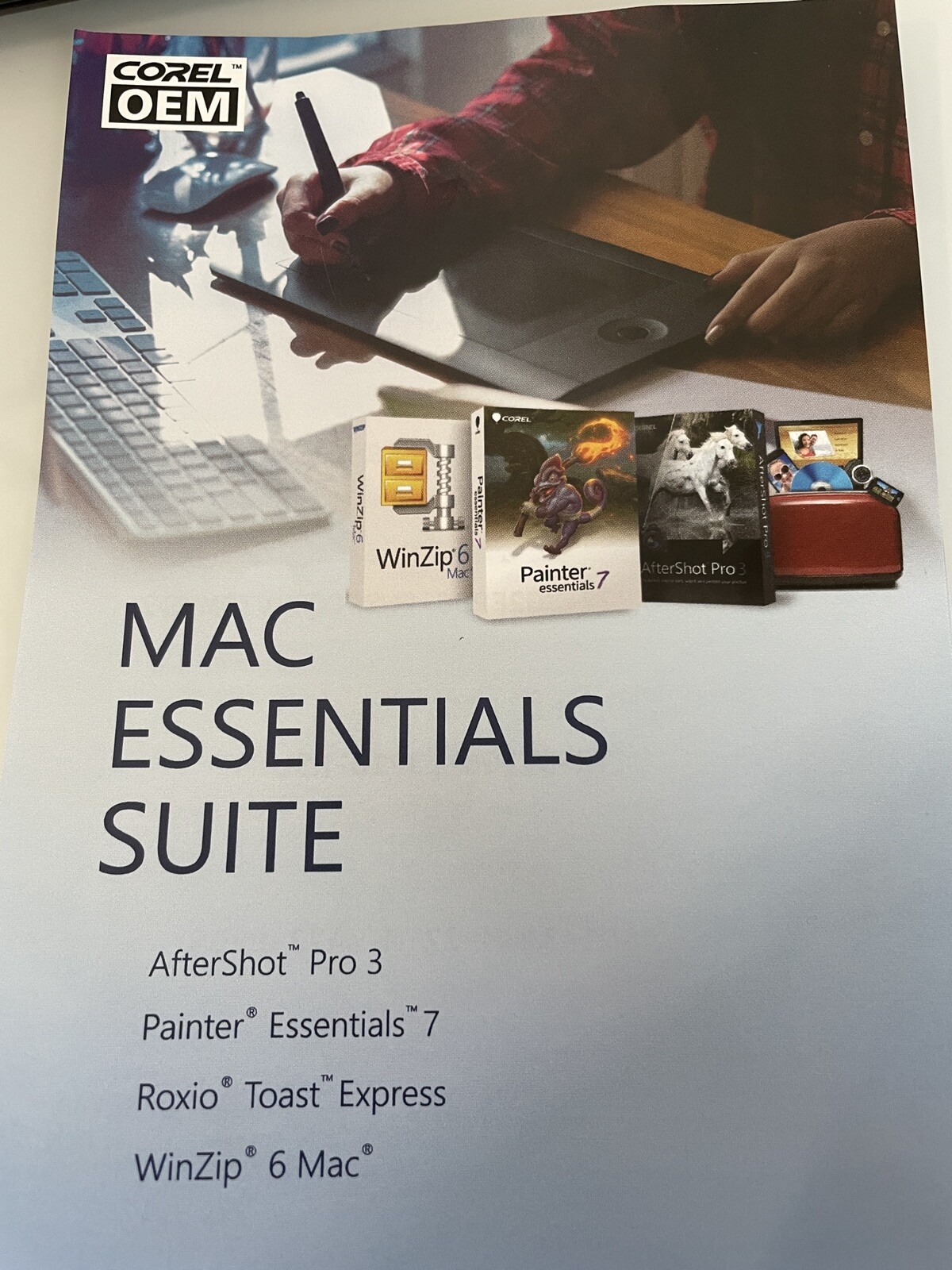
- AfterShot Pro 3
- Painter Essentials 7
- Roxio Toast Express Video Software
- Winzip 6 Mac
- AfterShot Pro 3 -
Edit faster, deliver higher quality images sooner and get back behind the camera where you belong with Corel AfterShot Pro 3, the world's fastest raw photo-editing software. Brand and protect your work with new Watermarking. Enhanced Highlight Recovery, including a range control, helps you regain more detail in overexposed images. Save editing time with new Blemish Remover tools, comprehensive batch processing and a new Image Preset Library-after all, time is money. Tailor your software to meet your needs by making your own lens corrections and plugins and easily updating camera profiles.
Powerful, affordable and subscription-free, AfterShot Pro 3 is the fastest way to sort, select and perfect your photos. Corel AfterShot Pro 3 is up to 4x faster than Adobe Lightroom. It's the photo editor that reveals your true creative potential and frees you: from high costs, from endless subscriptions, from hours spent editing at your computer. Import, process and output faster and get back behind the camera where you belong with AfterShot Pro 3. Uncover the pro photographer's secret to time-saving photo editinghe camera where you belong with AfterShot Pro 3.
- Painter Essentials 7 -
Painting software for beginners
• Painting software for beginners
• User-friendly interface
• AI-based photo painting
• Industry-acclaimed brushes
• Incredible speed
• Built-in learning
The ideal painting software for beginners
Start your creative journey with Painter Essentials 7, the best paint program for beginners to explore and expand artistic curiosity using impressive, easy-to-learn tools.
Distinctive Artificial Intelligence based photo painting
Produce incredible photo art with ease by converting your favorite photos into paintings using neural networking and the strength of Painter's brush engine! Choose from an impressive range of AI styles for photo painting, including Bold Watercolor, Colored Pencil, Colorful Dabs, Impressionist, Smooth Acrylic, Van Gogh, Watercolor Portrait, and Charcoal Drawing.
Flexible photo painting tools
Open your image and the painting choice is yours. Auto-Paint, in one click, with AI, or SmartStroke technology that rapidly produces stunning results. Clone paint by dipping any brush you like directly into the photo, or trace by turning on tracing paper and selecting a brush and color while using the image as your guide.
Experiment with blank canvas painting
Immerse yourself in an intriguing collection of realistic brushes and canvas textures that respond to your every move when using a pressure-sensitive drawing tablet. Dry, wet, springy, speckled, spattered, glowing, gooey, patterned media is at the ready, allowing you to bring your wildest ideas to life.
Industry-acclaimed brushes
Create with artist-trusted brushes. Every brush in Essentials was custom selected for new digital artists from our professional Painter art studio so that you can comfortably ease into your digital art experience.
Tools and effects to inspire you
• Mirror
• Navigator
• Kaleidoscope
• Woodcut
• Apply Lighting
Additional brush packs
Browse our outrageously creative brush packs to enhance any kind of painting. Simplify your workflow with the perfect brush pack solution.
Explore our Learning Portal
Find just what you need to succeed! Tons of useful tutorial videos await you in our Discovery Center. You can also share artwork, benefit from tips, register for webinars and enter contests.
Brushes
Dab Stencils
Imagine knocking out areas of a brush so that the chosen texture takes center stage. That is exactly how you can paint with these one-of-a-kind brushes.
Dynamic Speckles
Paint with dynamic brushes whose multicolored speckles generate as you stroke! These brushes are unique to Painter and loved by artists.
Glazing
Blend colors like a master with these subtle brushes that allow opacity to build up smoothly along your brushstrokes.
Digital Watercolor
See how these brush variants produce controllable watercolor effects that are highly reactive with canvas texture. Now set diffusion, adjust wet fringe and dry paint.
Image Hose
Choose from a full library of Image Hose Nozzles so you can spray compelling imagery onto your canvas with the Image Hose variants included in the F-X category.
Artists
Mimic the Masters by adding multicolored Impressionist dabs, Sargent swirly flair ,and Van Gogh chunky paint to your masterpiece.
Blenders
Use these standout Painter brushes to perfectly blend painted strokes and artfully finish your work.
F-X
Obtain an array of creative results by either playfully impacting existing canvas content or by adding memorable strokes to a blank canvas.
Particles
Experience an infinite number of creative possibilities with these physics-inspired brushes that spring, flow, glow and gravitate onto the canvas.
Industry Acclaimed Brushes
Brush Selector
Explore 15 brush categories, including 23 new brushes, and easily choose brushes from distinct brush dab and stroke previews at-a-glance, no hover required.
Brushes
Enjoy a custom selection of digital art media types comprised of award-winning Natural-Media and Painter signature brushes, selected just for beginners.
Brush Controls
Brush optimization is in your hands. Modify brush variants to suit your needs using the many different adjustment options such as size, opacity, grain, texture and more.
Beginner-friendly UI
A painting environment that puts the focus on you.
Application icons
Essentials now features redesigned icons to make things easier on the eyes, simple to understand, and more efficient to use.
Dark UI
A meticulously transformed user interface reveals a darker theme with tool highlighting that allows the interface to melt away and painting to take center stage.
Scrubby Zoom
Overall document manipulation is now smoothly exhilarating. Take advantage of the ability to click and drag so you can zoom in and out of your document with ease.
Brush previews
View enhanced dab and stroke previews at-a-glance, saving you tons of time. With improved visuals, we've eliminated the need to hover in order to find the perfect brush.
Color Selector
See how the universal color selection process throughout Essentials is now a breeze. The updated Color Wheel includes new circular grabbers and a split color and clone painting preview.
Layers
Enjoy unlimited layers, blending with composite methods, adjusting opacity and many workflow enhancements that make for an effortless experience.
Property Bar
Streamlined Property bars include modern sliders, simple brush controls, media flyouts, and paper rotation so you can make adjustments in no time.
Performance
Essentials can easily manage memory-intensive operations, such as working on large canvases, scrubby zooming, rotating the canvas, working with layers and brushing, all at top speed.
Powerful photo-painting tools
Auto-Painting
No experience required! From the Photo Painting palette, open a photo, choose an Auto-Paint AI or SmartStroke style, and watch your painting transform before your eyes.
Clone Painting
Open your image and click "show tracing paper" from the Photo Painting palette. Use the Photo Painting Brushes, or any other brush in Essentials by clicking the Clone color from source button.
Tracing
Open your image and click "show tracing paper" from the Photo Painting palette. Choose any brush and your preferred color to paint with while using the photo as your guide.
Tools
Top tools ensure you are empowered to paint
Artificial Intelligence based photo painting
Choose from an impressive range of AI-based styles that convert your favorite photos into paintings using Neural Networking and the strength of Painter's brush engine.
Flow Map Textures
Now select from a library of Flow Maps and Paper Textures to ensure interesting canvas expression in your paintings.
Brush Tracking
The pressure of your stylus on a tablet determines the density and width of your strokes. Each artist uses a different pressure level and you can adjust Essentials to match with Brush Tracking!
Custom Brush Palette
Shift and drag your favorite brush variants into a custom brush palette for easy access and modify the preview to display as small or large icons.
- Roxio Toast Express -
Roxio Toast Express is easy, fast way to burn or copy your digital media. Burn music or data or create DVD movies complete with titles, menus and chapters. With all of the essential tools you need to copy and burn discs, Toast Express offers industry-leading tools in one comprehensive application.
- Winzip 6 Mac -
New WinZip for Mac offers simple zipping and unzipping right from its new Files pane! Enjoy one-click access, multiple viewing layouts, drag-and-drop functionality, support for 12+ compression formats and easy file management!
• Zip and unzip files instantly with WinZip's trusted compression
• Protect files with strong AES encryption
• Share directly to iCloud Drive, Dropbox, Google Drive and ZipShare, from within WinZip
• Successfully email large files and minimize storage needs
AfterShot Pro 3Jump to...System RequirementWindows:
Windows 10, Windows 8.1, Windows 8, Windows 7 with latest service pack (64-bit editions)
64-bit Intel or AMD processor (multi-core processor recommended)
2GB of RAM (4GB recommended for HDR)
400MB of available hard-disk space required
1024x768 resolution with 16-bit color display (1280 x 768 resolution with 24 bit or higher color display recommended)
Internet connection required for online help and program updatesSystem Requirement (Contd.)Macintosh:
Mac OSX 10.9 or later (64-bit edition), including Mac OS 10.13
All Intel Macs model are supported
2GB of RAM
250MB of available hard-disk space required
1024 x 768 resolution with 16-bit color display
Internet connection required for online help and program updatesSystem Requirement (Contd..)Linux:
Fedora19 or Ubuntu 14.04 or later (64-bit distributions)
64-bit Intel or AMD processor (multi-core processor recommended)
2GB of RAM
250MB of available hard disk space required
1024 x 768 resolution with 16-bit color
Internet connection required for online help and program updates
Dependencies: Glib 2.4, KDE or GNOME recommended (full list of dependencies in RPM & DEB packages)System Requirement (Contd...)Linux:
Enable desktop compositing and freedesktop.org-compliant window manager (KDE, Gnome and others) recommended
64-bit distributions require 32-bit compatibility libraries (ia32-libs)
Image formats:
JPG, TIFF
RAW file support from most leading camera manufacturers: ARW, CR2, CRW, DCR, DNG, MRW, NEF, NRW, ORF, PEF, RAW, RW2, RWL, SR2System Requirement (Contd....)Software required for application features:
Internet Explorer 11 or higher, or Microsoft Edge
Safari 5.1 or higherCameras SupportedCanon
Fujifilm
Kodak
Leica
Minolta
Nikon
Olympus
Panasonic
Pentax
Ricoh
Samsung
SonyRoxio Toast ExpressJump to...Supported Input FormatsAudio: AAC, AIFF, MP3, WAV, M4A, OGG, FLAC and Dolby Digital AC-3
Video: AVCHD, AVCHD Lite, AVI, DivX Plus HD, DV, FLV and F4V for Adobe Flash, MJPEG, MOV, MKV, MPEG-1/2/4, VOB, VIDEO_TS folder and Eye TV recordings
Photo: BMP, GIF. JPG, PDF, PSD, PNG, TIFF
Disc Images: ISO, BIN/CUE, IMG, DMG, CDR, NRGLanguagesEnglish, French, German, Italian, Spanish and JapaneseSystem RequirementIntel
OS X 10.7 or later (partial functionality on OS X 10.8)
VideoBoost requires a compatible NVIDIA card and 4GB of RAM for optimal performanceWinzip 6 MacJump to...System RequirementMac OS X 10.8 or higher
Intel 64-bit processor
Supports Apple Retina DisplaysPainter Essentials 7Jump to...WindowsWindows 10 (64-Bit) or Windows 7 (64-Bit), with the latest updates
Intel Core 2 Duo or AMD Athlon 64 X2 processor
4 physical cores/8 logical cores or higher (recommended)
AVX2 instruction set support (recommended)
2 GB RAM
8 GB RAM or higher (recommended)
2.8 GB hard disk space for application files
Solid-state drive (recommended)Windows (Contd.)1280 x 800 @ 100% (or higher) screen resolution
1920 x 1200 @ 150% (or higher) (recommended)
Mouse or tablet
DVD drive (required for box installation)
Microsoft Internet Explorer 11 or higher, with the latest updates
To activate your product, you must connect to the Internet and register it first.MacmacOS 10.15, 10.14 or 10.13, with the latest revision
Intel Core 2 Duo
4 physical cores/8 logical cores or higher (recommended)
2 GB RAM
8 GB RAM or higher (recommended)
1.6 GB hard disk space for application files
Solid-state drive (recommended)
Case-sensitive file systems are not supportedMac (Contd.)1280 x 800 @ 100% (or higher) screen resolution
1920 x 1200 @ 150% (or higher) (recommended)
Mouse or tablet
DVD drive (required for box installation)
To activate your product, you must connect to the Internet and register it first.