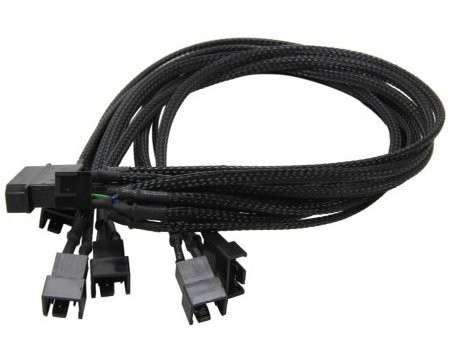
Supports 5 PWM Fans from a single PWM header Black Braided Cable Retail Packaged Application : 5 PWM fans from single PWM header Cable length : 45 cm Cable Material : Copper PSU connector : 4pin Molex Fan connector : 5 x 4pin PWM(one with RPM response for motherboard) Product code : EC-DF001
Purchase the EC-DF001: First, make sure you have the EC-DF001 fan splitter, which is designed specifically for this purpose. You can find it online or at electronics and computer hardware stores.
Prepare Your Fans: Ensure that the fans you want to connect are 4-pin PWM fans. These fans have four wires: black (ground), red (power), yellow (RPM signal), and blue (PWM control signal). Ensure you have enough 4-pin fans to connect to the splitter.
Prepare Your Fans: Ensure that the fans you want to connect are 4-pin PWM fans. These fans have four wires: black (ground), red (power), yellow (RPM signal), and blue (PWM control signal). Ensure you have enough 4-pin fans to connect to the splitter.
Connect the Splitter and Monitoring: Plug the male end of the EC-DF001 splitter into the PWM fan header on your motherboard or fan controller. The connector should only fit one way, so align it properly. Use your motherboard's software or third-party fan control software to monitor and adjust the fan speeds as needed. This allows you to balance performance and noise according to your preferences and system cooling requirements.
Power On Your System: Once everything is connected, power on your computer. The PWM signal from the motherboard or fan controller will control the speed of all the connected fans. You can adjust fan speeds through the BIOS/UEFI settings or motherboard software.