 When you click on links to various merchants on this site and make a purchase, this can result in this site earning a commission. Affiliate programs and affiliations include, but are not limited to, the eBay Partner Network. When you click on links to various merchants on this site and make a purchase, this can result in this site earning a commission. Affiliate programs and affiliations include, but are not limited to, the eBay Partner Network.
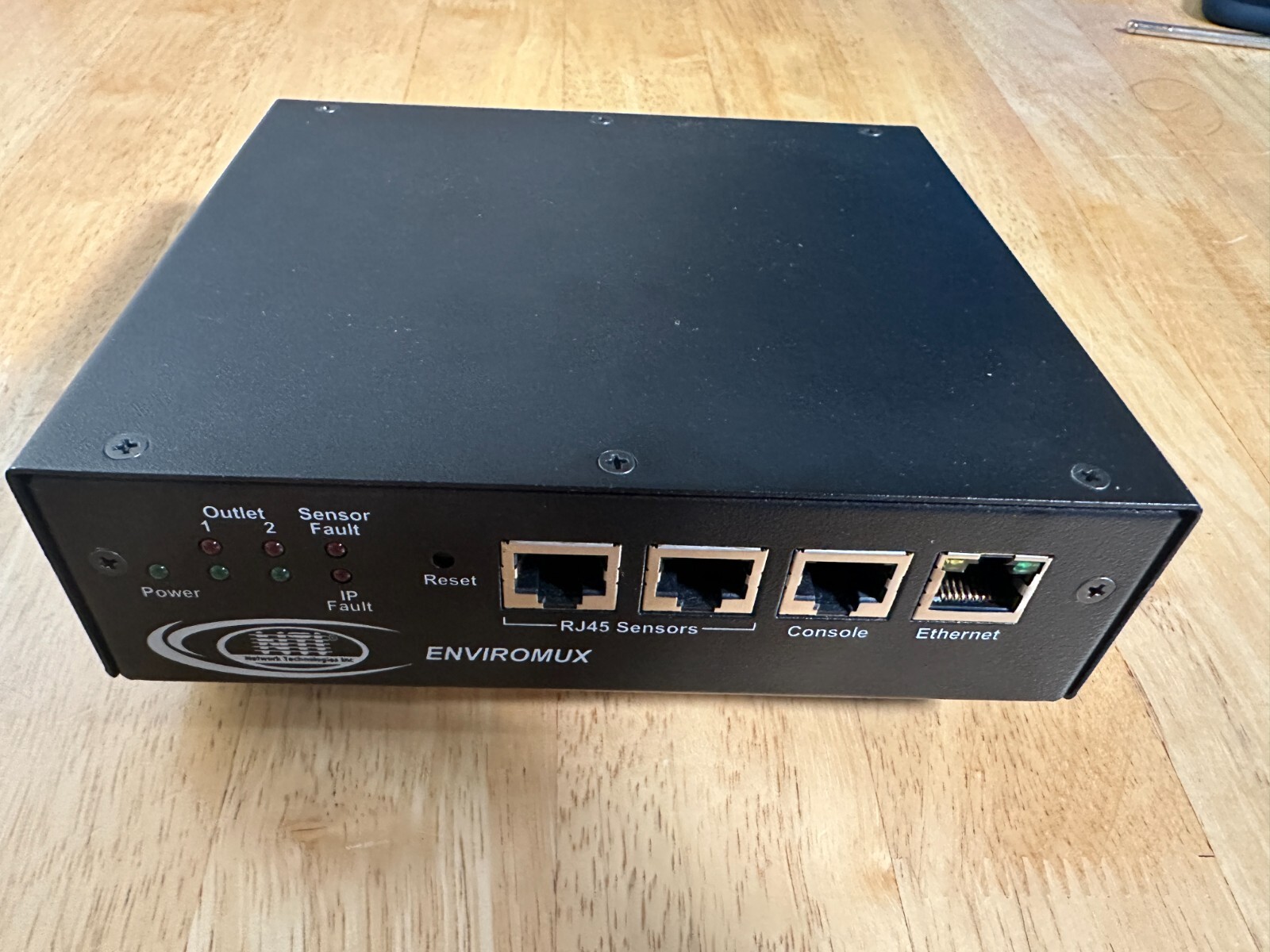
NTI IPDU-S2 Secure Remote Power Control Unit with Environmental Monitoring: 2 Outputs, 10A, N.O. Relay Contacts. Content:IPDU-S2 x 1PWR output cable x 2PWR input cable x 1Console Cable x 1 (Important: Cisco RJ-45/DB9 console cable cannot be used.) Securely control power on/off/reboot to a server, router, web cam, firewall or other remote devices over IP. Also known as: secure remote reboot CAT5, Web remote power, intelligent power distribution management, secure PDU, power over ip, control power on off IP, internet power switch The ENVIROMUX® Secure Remote Power Control Unit allows you to remotely reboot and control power (on/off) to two servers or other powered devices from any location via secure web interface, RS232, SSH, or Telnet. Description The ENVIROMUX® Secure Remote Power Control Unit allows you to remotely reboot and control power (on/off) to two servers or other powered devices from any location via secure web interface, RS232, SSH, or Telnet. - Three operating modes for power reboot:
- Manual – select the outlet and turn the power on/off.
- Scheduled – set date/time/duration of power cycle.
- Associated
- Power on/off a device when a sensor goes out of range of a user-defined threshold.
- Reboot (power cycle) and control power (on/off) to unresponsive IP devices that are connected to the IPDUs power outlets.
- Security: HTTPS, SSHv2, SSLv3, IP Filtering, LDAPv3, AES 256-bit encryption, 16-character username/password authentication, user account restricted access rights.
- Configure, control and monitor the unit via Web interface or Command Line Interface (CLI).
- Up to 3 additional IP aliases can be configured to allow remote control of the unit using different networks.
- No scripts required - simply add the IP address, network mask, and gateway configurations through the web interface.
- The first network (default network) will be used for total control of the unit, i.e. inbound and outbound connections.
- The three other networks will allow web/SSH/telnet access only, i.e. inbound access only.
- Up to four separate networks can be plugged into a network switch that is linked to the unit to facilitate the configuration.
- Supports twoenvironmental sensors, including: temperature/humidity and water detection.
- Shut down power when high temperature and other environmental threats are detected.
- Monitor (ping) up to eight IP network devices.
- Unresponsive IP devices can be configured to trigger devices connected to the IPDUs power outlets to power on/off/reboot.
- Sends alert notifications via email, syslog, LEDs, Web page, and SNMP.
- Automatically configures network settings received from a connected DHCP server.
- If a DHCP server is not found, the default static IP address will be used.
- Integrates with various Open Source monitoring packages - Nagios and MRTG.
- The unit can be polled via SNMP.
- Meets the electrostatic discharge (ESD) immunity requirements of IEC/EN 61000-4-2
- Features Normally Open (NO) relay style="margin:0px 0px 0px 15px; padding:0px; font-weight:normal; list-style:disc;">
- 90 to 250 VAC at 50 to 60 Hz.
- Power consumption: 2.7W max
- Input Connector: IEC 320-C14 inlet
- Output Connectors: IEC 320-C13 outlets
Current RatingNTI Part Sensor Ports - Two RJ45 modular jacks for connecting NTI temperature/humidity and liquid detection sensors.
- One 10/100 Base-T Ethernet port with RJ45 Ethernet connector.
Console Port - One female RJ45 port for terminal access.
DimensionsNTI Part #Desktop Size style="margin:0px 0px 0px 15px; padding:0px; font-weight:normal; list-style:disc;"> Operating temperature: 32 to 122°F (0 to 50°C).Storage temperature: -13 to 149°F (-25 to 65°C).MTBFNTI Part #MTBF (hrs)IPDU-S2183,724 Protocols - HTTPS, SSHv2, SSLv3, TLS, LDAPv3, AES 256-bit, 3DES, Blowfish, RSA, EDH-RSA, Arcfour, SNMPv2c; IP filtering, IPV6
- Operates and configures via HTTP/HTTPS web page, Telnet, SSH, or RS232 interface.
- Alerts are sent using email, syslog, and/or SNMP traps.
- Alerts are posted in event log, which is accessible through Web user Approvals
- CE, RoHS
- EN51055, EN50121-3-2
- TAA compliant.
WarrantyControl MethodsWeb Interface (view product demo)- Configure, control and monitor via HTTP/HTTPS webpage.
- Configure outlet operation settings, sensor thresholds and timing, alarm methods, alert formats, sensor/IP device outlet association, and system data log.
- Add up to 3 additional IP aliases that allow remote control of the unit through different networks.
- No scripts required - simply add the IP address, network mask, and gateway configurations through the web interface.
- The first network (default network) will be used for total control of the unit, i.e. inbound and outbound connections.
- The three other networks will allow web/SSH/telnet access only, i.e. inbound access only.
- View outlet status, sensor values, IP device values, and alert status on one summary page.
- View, Edit, Turn On/Off, Cycle buttons for each power outlet.
- View and Edit sensors and IP devices.
- View entries stored in the system logs.
- Event log records system events such as alerts, user login/logout, failed email messages, etc.
- Data log records samples of sensor readings. User specifies sampling time period.
- The log can be downloaded as a tab-delimited plain text file.
- Configure IP information, SMTP settings, SNMP settings, IP filtering, and user administrative settings.
- Administrate up to 15 users plus a root administrator.
- Configure permissions, schedule and alert methods for each user.
RS232/Telnet/SSH- Configure, control and monitor over the text-based menu system accessible via RS232, Telnet, and SSH.
- Access is controlled via username/password.
- System stores encrypted login information.
- Two user levels: user and administrator.
Front Panel LED Indicators- "POWER" (green) – indicates device is powered.
- "OUTLET" (green / red) – outlet is on or off.
- "SENSOR FAULT" (red) – lights up if a sensor goes out of range of a configurable threshold.
- "IP FAULT" (red) – lights up if an IP device is unresponsive.
Network Operation- Automatically configures network settings received from a connected DHCP server.
- If a DHCP server is not found, the default static IP address will be used.
- Integrates with various Open Source monitoring packages - Nagios and MRTG.
- The unit can be polled via SNMP.
Open Source Monitoring Integration- SNMP Plugin for Nagios
- NTI SNMP Plugin for Zabbix
- Using Multi Router Traffic Grapher.
Secure Remote Power Reboot Web Interface Screen Shot
Secure Remote Power Reboot Text-Based Menu Interface Screen Shot

|
|