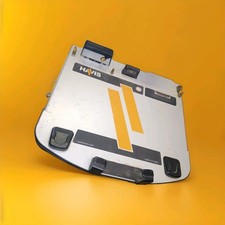
The package contents:
Hard Drive
(Used)
Hard drive caddy
(used)
Compatibility:
Panasonic Toughbook
CF-53 only:
This product is available
for the following Panasonic Toughbook models: CF-30, CF-31, CF-52, CF-74.
Please to check our other listings or send us a message.
If you need the HHD
only, please send us a message.
Operating system on the HHD:
📍WINDOWS 10 PRO 64 BIT.
Freshly installed, fully updated.
The
buyer may send us the details about his laptop so that we use a laptop with the
same specs, send us the details about your laptop means less headache with
additional updates for you when receive the product.
It’s
the buyer’s responsibility to activate the operating system. If you previously had an active operating
system, you may already have a compatible product key installed in your
motherboard; if so, the activation may happen automatically, or you may have to
do that manually by clicking troubleshoot
in the activation section in windows setting.
This
product is available on other operating system for no additional charge,
request should be sent before placing the order, possible delay may occur.
Units’ details and contents:
HHD:
📍CAPACITY: 250 GB HHD (2.5 inches internal hard drive).
CONDITION: used (We may send
you one with more capacity if out of stock.
CONNECTIVITY TECHNOLOGY:
SATA.
BRAND: YOU WILL RECEIVE
ANY BRAND BASE ON AVAIBILITY.
SPECIAL FEATURE: N/A
Hard Disk Form Factor: 2.5
Inches.
Hard drive caddy:
Hard Drive Caddy:
OEM Hard drive caddy
Included in the Caddy:
Foam protector and heater sink, see pictures.
Additional
programs:
Google Chrome
Microsoft office 2007 or
2010
TeamViewer
Winrar
Notice/warning:
Common issues with
Panasonic Toughbook CF-53 Touchscreen: It could be hard to use your Panasonic
Toughbook laptop with an issue with the touchscreen, it could be very hard to
disable it from device manager and We, as sellers have not found how to disable
it yet in the bios configuration, Please to understand that if you previously
have a Touchscreen issue, This product is not going to solve the problem, this
product is not the solution… We may send this product with the Touchscreen
already disabled in the device manager…Sometimes the best way to fix this issue
is to disconnect the Touchscreen cable itseft by removing the screen rear
cover.
Please let us know if
you have any issues with your Touchscreen so that we can find out what to do
before placing your order…
THANK YOU FOR CHECKING!
SEnD US A MESSAGE IF ADDITIONAL DETAILS NEEDED…