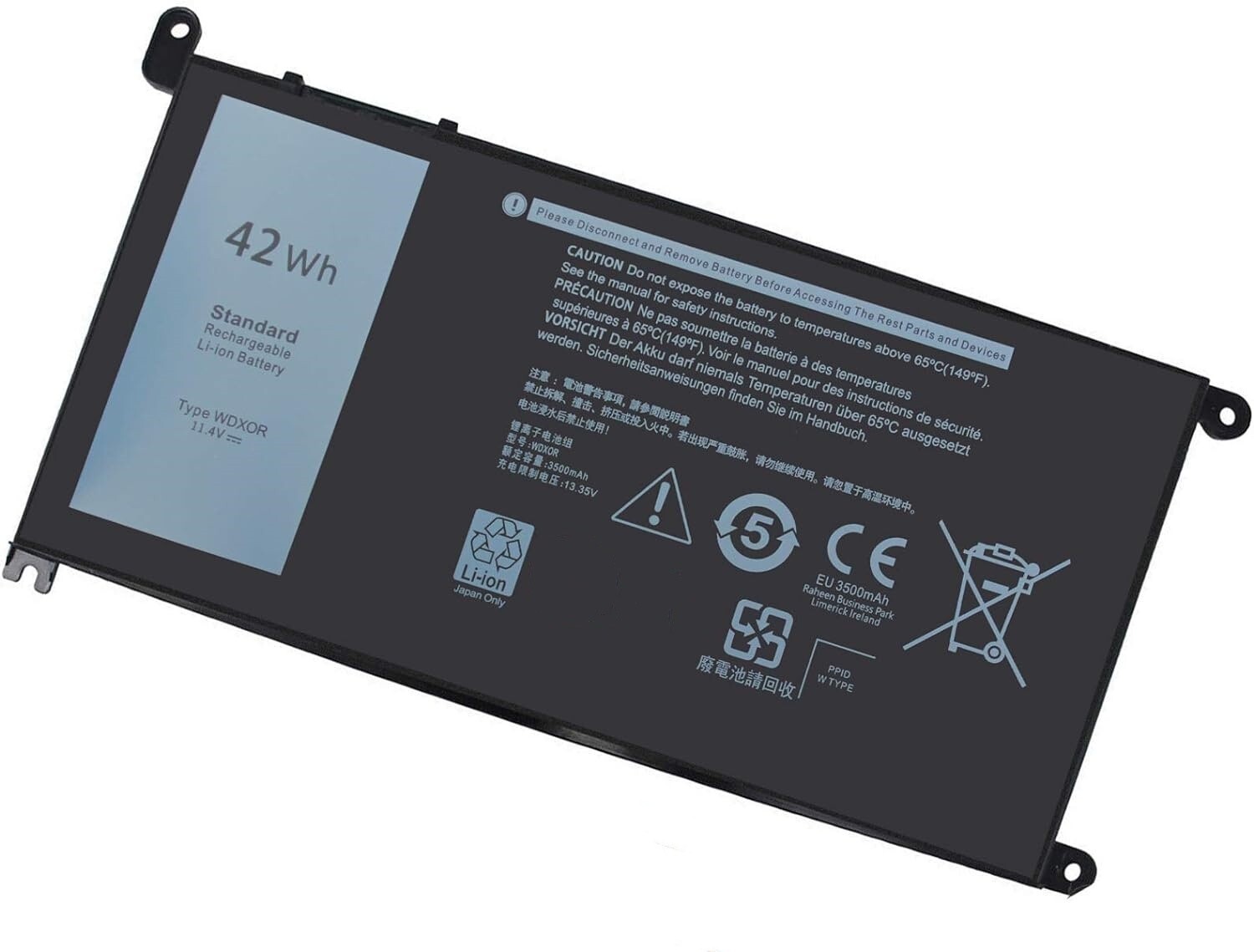
- Battery Type: Li-ion Voltage: 11.4V Capacity: 42WH ; Cells: 3-cell; Color: Black with Two Free Screwdrivers, wdxor 42wh laptop battery for dell
- Compatible P/N: WDX0R WDXOR YRDD6 0WDX0R 3CRH3 P58F P66F P75F P69G P69G001 T2JX4 C4HCW 0C4HCW FC92N; inspiron 5770 battery
- Compatible for DELL Inspiron 13 7368 7378 5368 5378 5379 15 5565 5567 5568 5578 7560 7570 7579 7569 17 5765 5767 5770 7460 Notebook Battery; inspiron 13-7378 battery
- New Manufacturer. Overcharge and Overdischarge Circuit Protection;Over-temperature and Short-circuit Protection; Up to 1000 recharge cycles over the life of the battery.
How to purchase the correct replacement battery?
To purchase the correct replacement battery for your laptop, follow these steps:
1. Check youroriginal battery's typemodel and shape by removing the laptop back cover. Use this information to search for the replacement battery.
2. Check yourspecific laptop modelname by pressing [Win] + [R] key and entering [msinfo32] or [dxdiag]. Click OK to find your system model. Use your laptop model name to find the correct replacement battery.
Why the laptop does not recognize the battery?
- Could be caused by battery loose. Please re-install the battery and make sure that the battery cable and the motherboard interface are tightly inserted.
- Maybe due to conductive material damaged which the laptop motherboard and battery anode and cathode contact position, you can try to confirm it with your original battery.
- Check whether the battery drive is in normal condition, if not, download the corresponding driver software to update
Specification:
- Item: WDX0R Rechargeable Battery
- Battery Type: Li-ion
- Cells: 3-cell
- Voltage: 11.4V
- Capacity:42Wh
- Condition: 100% New from Manufacturer, Grade A Cell
42Wh WDX0R Laptop Battery for Inspiron 13-5000 14-7000 13-7000 15-5000 15-7000 17-5000 seriesMain Features:
- True capacity
- Grade A NMC cells - Ensure longer life and dirability
- Built in multi-protection functions - short circuit, overheat & overload
- Up to 1000 recharge cycles
- Smart control chip - Quicker charging, lower power consumption and longer discharge time
Main Benefits:
- Economical alternative to costly OEM batteries
- 100% compatible to meet OEM specifications for safety and performance
- Constructed of high quality materials and circuit board to ensure durability and performance
WDX0R Battery Replacement for Dell Inspiron 13 7000 battery 7368 7378,for Dell Inspiron 15 5000 battery 5567 5570 5578 5579 5538 5565,for Dell Inspiron 15 7000 Battery 7560 7569 7570 7579 7580 7586 P58F P69G Battery
Compatible with Part Number :
WDX0R WDXOR YRDD6 0WDX0R FC92N 0FC92N 3CRH3 03CRH3 P69G P69G001 T2JX4 0T2JX4 C4HCW 0C4HCW CYMGM P74G P75F
Compatible with Laptop Models:
for Dell Inspiron 13 5000 Series 13 5368 5378 5379
for Dell Inspiron 13 7000 Series 13 7368 7378
for Dell Inspiron 14 7000 Series 14 7460
for Dell Inspiron 15 5000 Series 15 5565 5567 5568 5570 5578 5579 5538
for Dell Inspiron 15 7000 Series 15 7560 7569 7570 7579 7580 7586 P58F
for Dell Inspiron 17 5000 Series 17 5765 5767 5770 5775
for Dell Vostro 14 5000 Series 14 5468
for Dell Vostro 15 5000 Series 15 5568 5568D 5471
for Dell Latitude 3180 3189 3480 3580 3379 Series and more
for Dell Inspiron 13-5368 13-5378 13-5379 13-7368 13-7378 14-7460 15-5538 15-5565 15-5567 15-5568 15-5578 15-7560 15-7569 15-7570 15-7579 17-5765 17-5767 17-5770
Best Quality Battery Cells
The stability of a battery and the length of its battery life -it all boils down to the battery cells inside. DMKAOLLK will strive to provide customers with a more stable and safer battery.That's why our battery packs are comprised of grade "A+" cells with top quality ion battery materials.
Perfect Fit
All of our batteries are brand new and are 100% compatible to meet OEM specifications for safety and efficiency. Same size as original battery, Don't worry about assembly and adaptation issues
DMKAOLLK Security
DMKAOLLK batteries comes with safety features designed to protect you from the common risks involved when using electronic gadgets – UL/CE-/FCC-/RoHS certification for safety, and safeguards against short circuiting, overheating, and overloading.
What can you get?
1X WDX0R battery
Install A New Battery:
1, You need to turn off your laptop and disconnect the power.
2, Disconnect the connection between the old battery and the motherboard to avoid unnecessary damage caused by disassembling the battery. Then unscrew the old battery screws one by one and carefully save each screw.
3, Remove the old battery, carefully install the new battery on the battery case, screw in the screw, and connect the wiring of the new battery.
4, If you don't understand the above steps, you can search for the video about laptop battery installation on YouTube. Maybe it will help you.
Laptop Maintenance Tips:
1.New battery: Discharge the new battery to 10% (not 0%), then charging up to 95% and cycle 3-5 times. So that it can be activated completely
2.Overuse: Do not always run out of a battery to 0%, this would make it damaged or usage life shortened
3.Charging sequence: when charging, first install the battery, then turn on the power, when fully charged, first cut off the power, then pull the power plug.
4.Long-term storage:Please store the unused battery fully charged.(Charge it once a month) Do not store at low power to prevent reduce the lifespan of a battery
5.Please feel welcomed to notify us of any inconvenience or fault in our battery.
The following are troubleshooting methods:
1.Turn off the laptop.
2.Unplug AC power.
3.Remove the battery.
4.Replace AC power.
5.Turn on laptop,allow OS to boot.
6.Once logged in to the machine,perform a normal shut donw.
7.Unplug AC power.
8.Replace battery.