You can always trust Starink
Please disable the auto update firmware function
As one of the top manufacturers of printer consumables, STARINK company is specialized in ink cartridge, Toner cartridge, refill ink. STARINK brand was establish in 2005. The STARINK logo's color composition is combine with Black, Cyan, Magenta, Yellow. Implied meaning restore the essence of nature, make the printing more vivid and more colourful
- Best Sales from Starink
Visit the Store
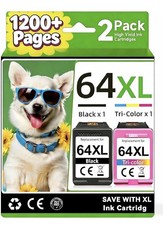
Product descriptionCondition: Brand NewModel Name: For HP 64XL 64-XL Ink Cartridges with chipCompatible Brand: For HPColor: Black and Tri-ColorChip: With ChipPackage Contents: 1xBlack + 1xTri-ColorPage Yield: Up to 480 pages per Black ink, 350 pages per Color ink at 5% coverage Printer Model:Envy Photo Series: 6220 6200 6222Envy Photo Series: 6230 6232 6234 6252 6255 6258Envy Photo Series: 7100 7120 7130 7132 7134 7155 7158 7164Envy Photo Series: 7800 7820 7822 7830 7855 7858 7864
Tango Series: Tango Terra,Tango Smart Home,Tango Smart Wireless,Tango X Smart All-in-One,Tango X Smart Wireless
Product FeaturesContents: For HP 64XL Black / HP 64XL Tri-Color (Show Accurate Ink Levels)Warranty 100% satisfaction guaranteed.Ink Type: Black - Pigment ; Tri-Color - DyeCartridge Type: Remanufactured(Not OEM)Package include: Multiple combinations to match, packaged and shipped as you choose.Page Yield: black-600 / tri-color-415 pages per ink cartridge (determined by 5% page coverage)Compatible With:
- Envy Photo Series: 6220 6200 6222 6230 6232 6234 6252 6255 6258 7100 7120 7130 7132 7134 7155 7158 7164 7800 7820 7822 7830 7855 7858 7864
- Tango Series: Tango Terra,Tango Smart Home,Tango Smart Wireless,Tango X Smart All-in-One,Tango X Smart Wireless
If your printer model is: Envy lnspire confirm that you have not activated hp+ service, or you have temporarily canceled it to ensure compatibility.(This will not affect the printing function, and you can reactivate it at any time).
Seller NoteIf the printer does not work after installing the cartridge, clean the chip contacts of the cartridge with an eraser or cotton swab. Be careful not to touch the ink nozzles at the bottom of the cartridge.Precautions for Ink Cartridge Use
1. When handling new ink cartridge,don’t touch the electrical contacts or print head nozzle on a cartridge.2.Do not remove the electrical contacts except for the protective tape. Otherwise the machine will not work properly.
3.If the printer prompts "Low Ink" or "Empty" (or similar messages), you can click "OK", "Continue" or "√" to bypass the printer prompts and use the cartridge directly.
On Oct 11, 2026 at 19:06:34 PDT, seller added the following information: