Notes:
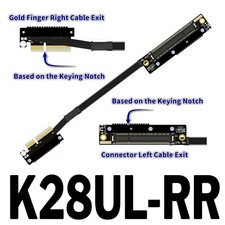
1. When inserting the cable, be sure to recognize the direction and avoid inserting it in the wrong direction or position to prevent burning out the equipment. When inserting the cable, first hold the device's socket and then plug it in to avoid forcefully disconnecting the socket pins. Bending and pulling are prohibited within 2cm of the welding point between the two ends of the wire and the circuit board.
2. The signal driving capabilities and other conditions of various motherboards and devices are not the same. Our store's test results do not guarantee consistency with yours. As long as an extension cable is connected, there will be signal loss and compatibility issues. For those with high requirements, please do not purchase.
3. Graphics cards or motherboards are electronic devices that will age and oxidize over time, and connecting extension cords will only make them more unstable. Old devices are not supported. Your device is not supported if it is over three years old. Please do not purchase.
4. Purchase is limited to products designated by the product engineer for product testing purposes only. Do not purchase for other purposes.
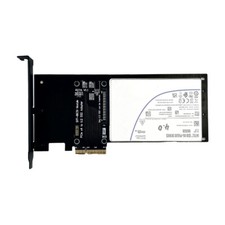
ADT PCIe 5.0 x4 to U.2/U.3/E1.S/E3.S SSD Adapter Card PCI Express Gen5.0 x4 to U.2 SFF-8639/U.3 SFF-TA-1001 Hard Drive Adapter
Product Model:R27A,R27B,R27C
Product Name:
PCIe 5.0 x4 to U.2 (SFF-8639) Adapter Card
PCIe 5.0 x4 to U.3 (SFF-TA-1001) Adapter Card
PCIe 5.0 x4 to E1.S/E3.S (SFF-TA-1002) Adapter Bandwidth: PCIe 5.0 x4
Purchase Tips: Be sure to buy 1~2 samples to test and verify thatthere is no problem, and then purchase large quantities.
Product Model Description:
1. Supports PCIe 5.0 X4 compatible with Gen3/Gen4/Gen5.
perfect fit for U.2/U.3/E1.S/E3.S hard disk.
4. high-frequency, low resistance to high temperature and oxygen-resistant PCB boards, non-deformation of the color yellow
Summary of technical issues
Please refer to the diagram below and insert the hard disk
R27A and R27B D2 lamp for the power indicator,
D1 lamp is always on, D2 lamp read-write state will blink.
D1 lamp will be on as long as the device is in the power state,if you need to extinguish the lamp, please turn off the power.
please refer to the installation video for detailed installation procedures;
please refer to the installation video to use different types of screw packs for different types of hard disk.
R27C is suitable for E1.S hard disk and E3.S hard disk,
U.2 and U.3 although the interface appearance is the same,
please pay attention to identify.
Does model R27C support 5.0?