ADT Pcie5.0/4.0x16 to 4-Port U.2/Edsff Hard Disk Split Transfer Extended Card For Sale
When you click on links to various merchants on this site and make a purchase, this can result in this site earning a commission. Affiliate programs and affiliations include, but are not limited to, the eBay Partner Network.
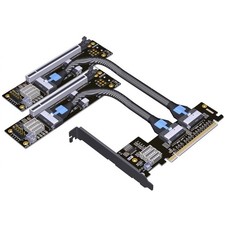
ADT Pcie5.0/4.0x16 to 4-Port U.2/Edsff Hard Disk Split Transfer Extended Card
External power supply support with reverse current protection, prevents reverse current damage and secures your motherboard power circuit.
Custom baseboard design, perfectly fits different form factors of E1.S and E3.S drives.
Gold-plated edge connector with 10U gold thickness, meets IPC Class 1 international standard.
High-frequency, low-resistance, high-temperature anti-oxidation PCB material. No deformation, amber translucent PCB, will not fade or blacken.
FAQQ: Why only one drive is detected after enabling PCIe bifurcation on motherboard?
A:
Verify your motherboard bifurcation setting must be configured as x4x4x4x4. If set to x8x8 or x8x4x4, only one drive will be recognized.
Confirm the PCIe slot you installed this card supports full PCIe x16 bandwidth. Check your motherboard manual for details.
Q: How to check if my motherboard supports PCIe Bifurcation?
A:Please refer to your motherboard manual or BIOS menu. Look for terms: PCIe Bifurcation / Bandwidth Split. If there is no such option, your motherboard does NOT support PCIe bifurcation.
Note: PCIe bifurcation function depends on motherboard chipset and BIOS support.