With flash media evolving worldwide, so has the need for duplication for such medias. The latest being the next generation of smaller storage on computers and mobile devices. As such so has EZ Dupe in revolutionizingthe M.2 NVMe market!
EZ Dupe proudly presents our newest entry to the high tech industry duplication services. The NVMe Cyclone Pro series!
The NVMe Cyclone comes in two duplication copy sizes (up to 4 or 9) and two separate speed (300MB/sec and 600MB/sec). Each of the 4 variations will be in two series in standard (for PCIe NVMe & SATA NVMe) and Pro (PCIe NVMe, SATA NVMe, & SATA interfaced Hard Drive Disks). Total of4 NVMe Cyclone and 4 NVMe Cyclone Pro duplicators will be in the market.
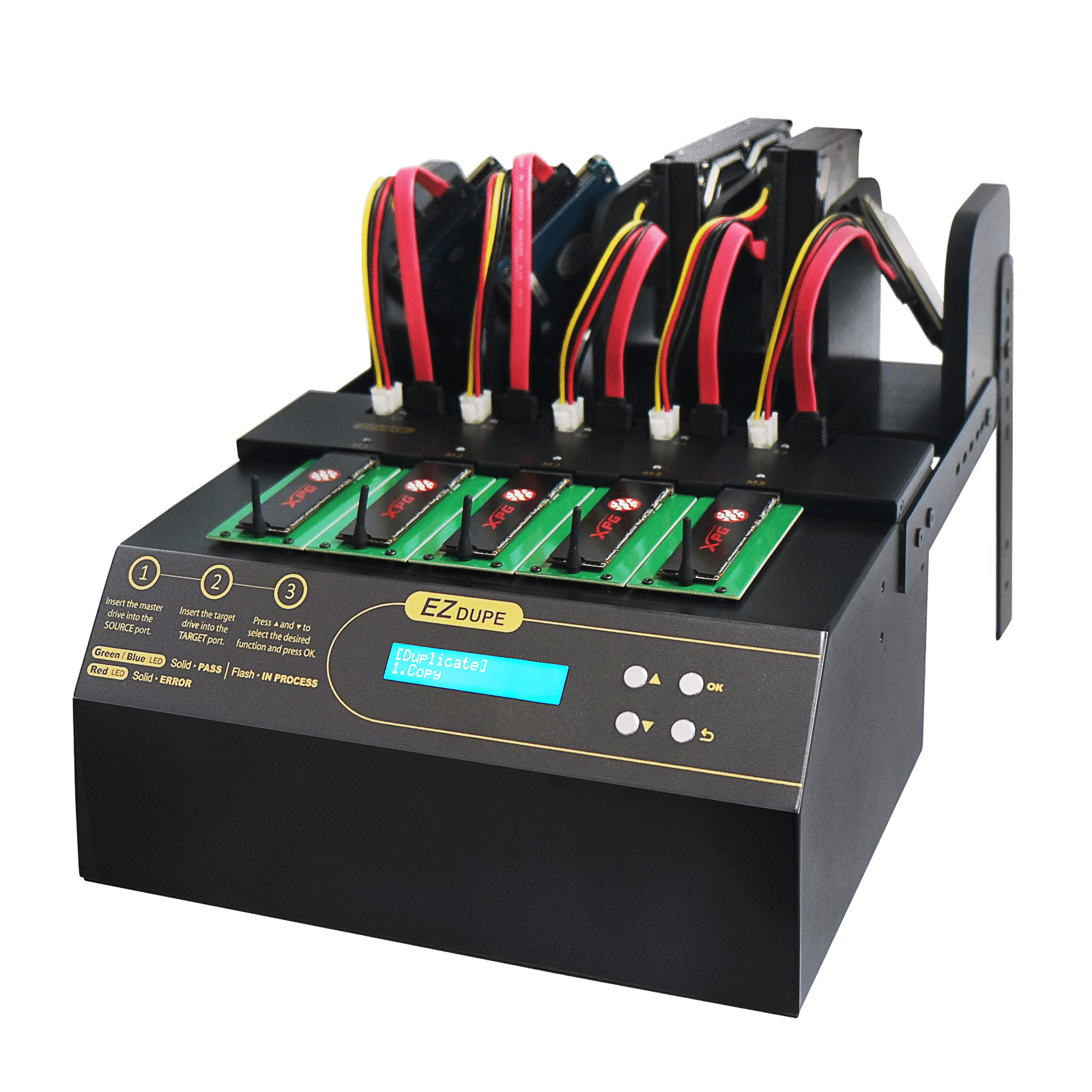
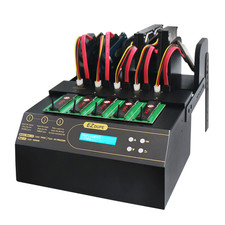
EZ DupeCyclone Pro duplicator is a specially designed architecture to supportM.2 NVMe,M.2 SATASSD, and SATA interfaced Hard Drive connections. This PCIe M.2 SSD duplicator fits for enterprise applications and digital computing devices.
Copy information onto multiple drive formats simultaneously with the1 to 4 M.2 PCIe NVMe / SATA SSD Duplicator and SanitizerfromEZ Dupe. Designed to deploy files across multiple M.2-based drives efficiently, this duplicator gives you the ability to copy up to Four M.2 NVMe solid-state drives simultaneously with a single press of a button.
This duplicator is ideal for enterprise-level tech professionals who need to image several computers, backup files, and fully erase drives with ease.
Easy to Use
This duplicator can be used with a computer or standalone, allowing you to use disk-to-disk duplication or copy without the need for additional software.
Easily copy, erase, and format multiple M.2 NVMe drives simultaneously with the press of a button. If needed, quick, full and custom erase functionality is also available, enabling you to efficiently factory reset your drives.
NVMe Cyclone Prointegrated SATA connections to the NVMe Cyclone series for 2.5" & 3.5" Hard Drive Disks (HDD) and Solid State Drives (SSD). The pro series also offers a seamlessly crossover integrations between SATA and M.2 NVMe connections.
NVMe Cyclone Pro automatically detect NVMe and/or SATAconnections to copy fromone interface to a different interface connection:
- M.2NVMe to M.2 NVMe
- M.2 NVMe to HDD/SSD (SATA)
- HDD/SSD (SATA) to M.2 NVMe
- HDD/SSD (SATA) to HDD/SSD (SATA)
Optimal Compatibility
Create copies quickly with data transfer rates up to 18GB per minute or 300MB per second, giving you quick and efficient duplication across M.2 drives. This duplicator supports different interfaces including M.2 NVMe, B Keys, M Keys, and B + M Key drives.It will accept 22mmwide keys (M, B, and B+M).
While these formats are supported, copying is only possible between devices that share the same format. Additionally, lower speed solid-state and hard-disk drives can be filtered out with setup for higher copying efficiency.
Menu setting in theNVMe Cyclone Proallows users to decide on either to ban stalled NVMe (default setting) or slow disks progress from continuing, so the remaining NVMe may proceed in duplication at the new maximum copying speed.
Independent Channel on each slot
Each slot has its own independent bandwidth with the max copy speed set at the slowest speed of the M.2 NVMe. When abad M.2 NVMe stalled during the duplication copy process, the duplicator will automatically reject thestalled M.2 NVMe and the max copy speed will increase for the remaining copy slots.
TheNMVe Cyclone Prohave an added feature of rejecting slower M.2 / HDD to increase the copying speed for the other channels. Feature of this function can be adjust in the menu settings.
Event Log File
Download your Event Log File to one of the drive to confirm the status of each job function employ by the NVMe Cyclone. Event Log file's information includes: status of the job function, date/time stamp, and the drive's identification numbers.
Efficiently Designed
The user-friendly design creates easy access for host and target drives, producing an ergonomic feel and making tasks easier to complete. The durable construction is built for long-lasting daily operation, keeping your production moving along efficiently.
Features, Copy Modes & Erase Modes
Features:
Mounts for M.2 NVMe and Rack for SATA Hard Drives
The NVMe Cyclone Pro offers different setup and configurations for the SATA Hard Drives. The Rack can be adjusted and setup. Ideal and created for utilizing space in your duplication area as there is a divider for each slot.
The duplicator can be lower for parallel mount to the M.2 NVMe flatbed area or the rack can be raised higher in a tower formation.
Bi-Directional Duplication between M.2 NVMeand SATA Hard Drives
Bi-Directional Crossover duplication can be accessed between the different interface of SATA hard drive disks (HDD) to M.2 NVMe, or vice versa.
The NVMe Cyclone Pro automatically detect NVMe and/or SATA signals to easily copy devices from one interface to another, such as:
- M.2 (SATA) to M.2 (NVMe)
- M.2 (NVMe) to HDD/SSD (SATA)
- HDD/SSD (SATA) to M.2 (NVMe)
- HDD/SSD (SATA) to HDD/SSD (SATA)
M.2 NVMe / M.2 SATA SSD connections
The NVMe duplication area can be inserted on the flatbed mount area of the duplicator. 22mm sized module of B-Key, M-Key, and B+M Key are all accepted. The length size of 2230, 2242, 2260, and 2280 keys can be inserted on each of the designated area with rubber stopper on the bottom for the longest key to prevent over-insertion.
Daisy-Chain Cyclone Pro
Daisy Chain your NVMe Cyclone Pro to another NVMe Cyclone Pro!
Important Note:You can connect multiple NVMe Cyclone Pro together to increase thehe amount of the duplication copies at the same time from one source slot of the duplicator. Daisy-Chain up to maximum of255 NVMe Cyclone Pro 600 together from one source to maximum destination slot copies of 2294.
Please notein that it needs to be in same models (ie NVMe Cyclone Pro 300 to NVMe Cyclone Pro 300.... or NVMe Cyclone Pro 600 to NVMe Cyclone Pro 600). It cannot mix different speed of NVMe Cyclone Pro.
Downloadable Event Log File
Download the Event Log File to one drivefor the detailed information of the completed function. The event log file would include the detailed type of job function, time/stamp of the completed job function, and the Identification number of the drive.
Purchase theLog File Printerto connect the NVMe Cyclone Pro to get the printed detail events of each job function.(Coming soon)
Quality Check
Check for bad sector, storage capacity or speed. Use this enhanced function to determine if the M.2 NVMe modules are in optimal condition for your installation.
H3 Read Test
H5 Read/Write Test
H6 Cyclic Unused Area Write/Read Test
H7 Fake Card Test
9 Testing Criteria
- Test range
- Bad sector ratio
- Read speed threshold
- Write speed threshold
- Storage Size Capacity threshold
- Format type
- Power off times
- Power off duration
- Execution cycles
4 Testing Results
- Bad sector quantity
- Tested capacity
- Average read speed
- Average write speed
Copy Modes & Erase Modes
Copy Modes:
Whole media copy - Comprehensive(Full Copy)
Whole Media copy will copy the entire M.2 NVMe drivesregardless of whether it has been partitioned or not. Longer Duplication Time is expected for full copy.
System and Files Copy – Intelligent Copy (Quick Copy)
System and Files Copy copies only stored system and files data, not unused space area. Intelligent Copies thatduplicates essential files in the M.2 NVMe drives to save time.
Example: Partition 1 has a capacity of 158GB with 58GB of data in it. Only 58GB of data will be copied while unused space area will not be copied.
All Partitioned Copy - Copy Partitioned Area Only
Example: a 600GBM.2 NVMe has two partitions.
Partition 1 with 158GB and Partition 2 with 200GB. While All Partition Copy mode is selected, these two partitions will be copied and the undefined area will not be copied
Percentage Copy - Setting up a starting point and end point
When the file system of aM.2 NVMe driveis undefined, Percentage Copy can be used by setting up the ending point of data to copy from the starting point of 0%.
Non-ZeroCopy -Excludes "zero"data area for proprietary sytems
Forunknown or proprietary systems,Non-ZeroCopy mode can be utilize to exclude "zero" data area for rapid and efficient copy for M.2 modules that contain proprietary system files such as SGI, BOS, and many other different operating systems.
Erase Modes:Quick Erase- Essential FilesErase the index of aM.2 NVMe drive within a few seconds.
Full erase - Entire Drive
Erase the data from aM.2 NVMe moduleby overwriting each sector which is able to read/write data.
3-Pass DoD
Erase M.2 NVMe module3 times complying with the 5220.22-M data erase security standard of the U.S. Department of Defense.
7-Pass DoD
Erase M.2 NVMe module 7 times complying with the 5220.22-M ECE data erase security standard of the U.S. Department of Defense to ensure the data is unable to be recovered.
Secure Erase
The Secure Erase Mode is approved by N.I.S.T. (National Institute of Standard Technology) SP 800-88 fordata sanitization solution that most lessens the risk to confidentiality while respecting any other constraints involved.
Enhanced SSD Erase
The Enhance SSD Erase Mode is approved by N.IS.T. for overwriting predetermined data patterns,data area including sectors that are no longer in use due to allocation. It erases data by using internal M.2 SSD's built-in ATA command.
Erase HPA area
Remove the HPA (Hidden Partition Area) and free up space
Erase DCO area
Remove the DCO (Device Configuration Overlay) partition
Operating TypeStand-alone Disk-to-Disk duplicationNumber of CopiesUp to 4 copies of M.2 PCIe NVMe or M.2 SATA SSD, SATA Interfaced Hard Drive Disks (3.5" or 2.5")Transfer Speed18GB/min (max speed depends M. 2 NVMe or M.2 SATA Internal SSD)Copy Mode
- System and Files (Quick Copy)
- Whole HDD (Full Copy)
- All Partitioned Copy- Partitioned area only
- *Percentage Copy- Set up Starting & End point copy
- *Non-Zero Copy- For proprietarysystems such as SGI, BOS, and other unknown formats can be quick copy in the "Non Zero" copy mode to exclude any "zero" data area for rapid and efficient duplication
*New Feature exclusive to EZ DupeFormat Supportedon Quick CopyWindow: exFAT, FAT16/32, NTFSLinux: EXT2 / EXT3 / EXT4Mac OS: HFS, HFS+, HFSX
※Other formats can be copied using the "Whole media" functionEraseModeFullErase- Whole MediaQuickErase- Essential FilesDoD 3-pass- 3 times erase in 5220.22-M standardDoD 7-pass-7 times erase in 5220.22-M ECE standardSecure EraseEnhanced SSD EraseHPA EraseDCO EraseSupported StorageM.2 PCie NVMe / M.2 SATA
22mm wide keys
Key Types
- NGFF (M.2) B key
- M key
- B + M key
SATA Slot(Top Slots)
- 2.5" or 3.5" Hard Drive / SSD (up to 5V per slot)
Language SupportEnglishPower Requirement115V - 230VStorage Temperature4°C ~ 85°COperating Temperature32°F - 140°FStorage Humidity20% ~ 80%Operating Humidity15% ~ 95%ModelDM-HE3-5M04PPWeight11 lbs
Dimensions
11 x 8.25 x 6"RegulationFCC, CE, UL
EZ DUPENVMe Cyclone Pro 300 1 to 4 M.2 NVMe PCIe SSD & SATA Hard Drive Duplicator
Ultra-fast duplication speed up to18 GB/minfor each destination slotsUp to 4 copies of either M.2 NVMe SSD or SATA interfaced Hard Drive DisksCrossover Interface duplication allows duplication between M.2 NVMe connectionsand Hard Drive Disk's SATAconnectionsThreeNew CopyFunctions: All Partitioned Copy, Non-Zero copy (for proprietary system to exclude "zero area" data for copies) & Percentage Copy (setthe end point to copy from 0% starting point)Intelligent Copymode to copy System and Files only, There is no need to copy the entireM.2 NVMe and allow you to do more in less time!
Full Copymode to copy theM.2 NVMe bit by bit (sector by sector)Daisy-chainallows multiple NVMe Cyclone Pro 300 units for multiple copies from 1 source slot tomultiple NVMe Cyclone Pro 300 units(Connectup to max of255 units)DoD 5220.22-M compliant erasefunction permanently deletes sensitive data as an eraserQuality Checktests for bad sector and capacity thresholdCapacity Checkto verify theM.2 NVMe capacityAllowsmeasuring the actual Read and Write speedof the target hard drivesDownloadable Event Log Filefor job completed function, time/date stamp, drives' ID# information can be download to the first destination slotSupport all file formats, file size and drive capacityRack Dividersfor each SATA Hard Drive Disks slot; adjustable for 2 positionsSupport MBR & GPTpartitioning schemes and copy device capacity more than 2TB (unlimited) as well as a single file larger than 4GB. Theadvanced format (4K)is also supportedAllows to set up a password for system boot-up to prevent unauthorized useIntelligent copy across different interfaces. Support PCIe NVMe (M.2) SSD, M.2 SATA, SATA SSD(optional adapter) duplicationSlower speed and stalled M.2 NVMe / SATA HDD can be filtered out with setup for higher copy efficiencyOS system files supported: Windows, Linux, and MacStandalone system; no computer, software or host required2 Year warranty with lifetime support