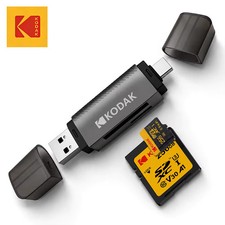
📱Kodak 4 in 1 Card Reader USB3.0 & Type C Universal Card Adapter Multifunctional adapter for SD Card & Micro sd Card,Kodak C210 4-in-1 USB 3.0 & USB-C Memory Card Reader – Professional Product Guide🌟 Introduction
Discover a convenient and efficient way to access, transfer, and manage your digital files with the Kodak C210 4-in-1 Memory Card Reader Adapter. Designed for users who need reliable access to memory cards across compatible devices, this compact external adapter combines versatile card-reading functionality with USB 3.0 SuperSpeed technology and convenient USB connectivity.
Whether you are a photographer managing high-resolution images, a content creator organizing video footage, a traveler backing up holiday memories, or a professional transferring work documents, the Kodak C210 offers a practical solution for everyday digital file management. 📸💻📂
Featuring support for multiple memory card formats, plug-and-play operation, and a portable design, this adapter helps simplify the process of moving digital content between compatible memory cards and computers, smartphones, and tablets.
With a stated maximum USB 3.0 transfer interface speed of 5 Gbps, the reader is designed to support efficient file transfers when used with compatible hardware and suitable memory cards. Actual performance depends on the memory card, host device, file sizes, connection interface, and other system limitations. ⚡🚀
Product Highlights:
🏷️ Brand: Kodak
🔢 Model: C210
🔌 Interface: USB 3.0 and USB Type-C connectivity, subject to the supplied adapter's actual connector configuration
💾 Card formats: SD, MicroSD, and TF, with additional compatible formats depending on card specifications
⚡ Maximum stated USB 3.0 interface rate: Up to 5 Gbps
🖥️ Installation: External
🔄 Operation: Plug and play on compatible devices
🛡️ Certification: UKCA, as stated in the supplied product information
📦 Package quantity: 1 piece
✨ Key Features⚡ 1. SuperSpeed USB 3.0 Data Transfer
The Kodak C210 is described as supporting USB 3.0 SuperSpeed connectivity with a theoretical interface rate of up to 5 Gbps (gigabits per second).
This high-bandwidth interface is designed to help transfer digital files efficiently, particularly when working with large collections of photographs, videos, and other data.
Benefits include:
🚀 Efficient transfer of large image collections.
📸 Convenient access to photographs stored on camera memory cards.
🎬 Practical file management for compatible video recordings.
📂 Easier movement of documents and other digital files.
⏱️ Reduced waiting time when the memory card and connected device can take advantage of the available interface speed.
Important: The 5 Gbps figure represents the theoretical USB interface rate, not a guaranteed memory-card transfer speed. Real-world performance is generally lower and depends on the card's read/write capabilities, the host device, the connection standard, and the type of files being transferred.
🔌 2. Convenient USB Connectivity
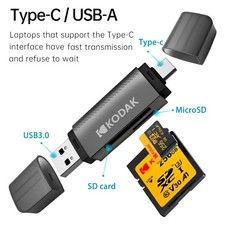
The supplied product information describes USB Type-C connectivity and also specifies a dual USB-C and USB-A configuration.
If the unit you receive includes both connector types, this arrangement can provide convenient access to compatible devices with different USB ports.
Potential applications include:
💻 USB-A laptops and desktop computers.
📱 USB-C smartphones and tablets that support USB OTG or external storage access.
🖥️ Compatible USB-C laptops and computers.
🎮 Other supported devices capable of accessing external memory-card readers.
Connector verification: The product information provided contains both a Type-C interface specification and a USB-A/USB-C dual-interface description. Confirm the physical connector configuration of the specific C210 unit before purchase.
USB-A and USB-C plugs must not be connected simultaneously if the supplied model has both connectors.
💾 3. Multi-Format Memory Card Support
Access files stored on supported memory cards without relying on a separate card reader for every format.
The supplied specifications identify SD, MicroSD, and TF card support. Additional compatibility is described for the following formats, subject to the card reader's actual supported standards:
💾 SD (Secure Digital)
💾 SDHC (Secure Digital High Capacity)
💾 SDXC (Secure Digital Extended Capacity)
📱 MicroSD
📱 MicroSDHC
📱 MicroSDXC
💾 TF (TransFlash, commonly used as another name for MicroSD)
💾 MMC, RS-MMC, and other listed legacy formats where supported by the specific unit
Compatibility note: Not every format listed above is guaranteed for every hardware revision. Check the product's confirmed specifications and your memory card's capacity and format before use.
🔄 4. Simultaneous SD and MicroSD Card Access
The supplied product information states that the reader can access SD and MicroSD cards simultaneously.
Where both card slots are present and support simultaneous operation, this feature can help streamline file management.
Practical advantages:
📸 Access files from a camera's SD card.
🚁 Read compatible MicroSD cards from action cameras or drones.
📂 Organize files from two supported cards during the same session.
⏱️ Reduce the need to repeatedly disconnect and reconnect different cards.
Simultaneous access does not necessarily mean that both cards can reach their maximum transfer speeds independently. Performance depends on the reader's internal design and the connected system.
🖥️ 5. Plug-and-Play Convenience
The Kodak C210 is described as an external, plug-and-play accessory that does not require a separate driver installation on supported systems.
Typical setup process:
🔌 Connect the reader to an appropriate USB port.
💾 Insert a compatible memory card into the correct slot.
🖥️ Open the device's file manager or supported photo-import application.
📂 Browse the available files.
📥 Copy or import the required content.
🔒 Safely eject the card reader before disconnecting it.
No separate power adapter is specified as necessary for normal operation. Power is generally supplied through the USB connection.
Driver-free operation and automatic detection depend on the operating system, device settings, and hardware compatibility.
🎒 6. Compact, Travel-Friendly Design
With a stated package size of approximately 15 × 15 × 1 cm (5.91 × 5.91 × 0.39 inches) and a stated package weight of 35 g (0.077 lb), the product is intended to be easy to carry alongside everyday electronics.
Portable design benefits:
🎒 Convenient storage in a backpack or laptop bag.
📸 Practical for photography equipment bags.
✈️ Suitable for travel and business trips.
🧳 Useful for organizing digital accessories.
💼 Easy to keep available for routine file transfers.
Measurement clarification: The dimensions and weight supplied are identified as package measurements. The actual adapter may be smaller and lighter. Confirm the product's net dimensions and weight if these are important for your purchase.
🛡️ 7. Kodak Brand Identification
The product is identified as a Kodak-branded C210 memory card reader.
Kodak is a recognized name in imaging and photography, making the product relevant to customers looking for a memory-card accessory associated with that brand.
The brand name alone does not establish the adapter's exact manufacturing origin, warranty coverage, or performance level. Check the seller's product listing and warranty terms for those details.
🇬🇧 8. UKCA Certification Information
The supplied product information lists UKCA certification.
UKCA is a conformity marking used for applicable products placed on the Great Britain market. The exact regulatory requirements depend on the product category.
Customers who require documented compliance should request or review the relevant conformity documentation for the specific product model. A listing statement alone is not a substitute for verification of applicable certification records.
⚙️ Technical numberC210Product typeExternal multi-format memory card readerMain functionMemory card access and data transferInterfaceUSB 3.0 and USB Type-C connectivity as described in the listingConnector configurationUSB-A and USB-C dual-interface operation is also described; verify the supplied versionMaximum stated USB 3.0 interface rateUp to 5 GbpsSupported primary card typesSD, MicroSD, TFAdditional listed formatsSDHC, SDXC, MicroSDHC, MicroSDXC, MMC, RS-MMC, subject to confirmed hardware supportCard slotsMulti-format; simultaneous SD and MicroSD access is statedInstallationExternalDriver installationNot normally required on compatible systemsExternal power supplyNot normally requiredPackage quantity1 pieceListed package dimensions15 × 15 × 1 cm / 5.91 × 5.91 × 0.39 inListed package weight35 g / 0.077 lbCertification statedUKCAOrigin stated in listingMainland ChinaHigh-concern chemicalsNone declared in the supplied note: The information above consolidates the supplied product details. Connector arrangement, supported card formats, simultaneous card operation, and operating-system compatibility should be confirmed against the exact unit being sold.📏 Measurement Guide: US and EU Units
For customers shopping in the United States and Europe, the supplied measurements are converted below.
ParameterMetric / EU UnitsUS UnitsListed package length15 cm5.91 inListed package width15 cm5.91 inListed package height1 cm0.39 inListed package weight35 g0.077 lbUSB 3.0 theoretical interface rate5 Gbps5 Gbps
Please note: Package measurements should not be interpreted as confirmed net product dimensions. No verified net weight, cable length, individual slot dimensions, or adapter body measurements have been supplied.
📦 Package Includes
The supplied listing specifies a single unit per pack.
Package contents clarification: A separate USB cable, memory card, protective case, instruction manual, or additional accessories are not confirmed by the supplied information. Please refer to the seller's actual package contents and product photographs on the sales platform if you need to verify included accessories.
📱 Where and How Can You Use It?📸 1. Digital Cameras
Use a compatible SD card to access photographs and other supported files from a digital camera.
Example workflow:
Turn off the camera before removing its memory card, following the camera manufacturer's instructions.
Insert the card into the reader.
Connect the reader to a compatible computer or supported mobile device.
Browse and copy the required files.
Safely eject the reader before removing the card.
Ideal for: Photography enthusiasts, family photographers, students, and professionals managing digital images.
🎬 2. Action Cameras and Trail Cameras
Many action cameras and trail cameras use MicroSD cards.
The reader can help you access compatible recordings without transferring each file wirelessly or reconnecting the original camera.
Useful for:
🏕️ Outdoor adventures.
🚴 Cycling and action-camera footage.
🌲 Wildlife and trail-camera recordings.
🏞️ Hiking and camping videos.
🎥 Personal video archives.
Actual video playback and transfer performance depend on the recording format, memory card, device, and application.
🚗 3. Dash Cameras
Compatible dash cameras commonly store recordings on MicroSD cards.
A supported reader can provide a convenient way to access footage on a compatible computer for review, copying, or personal archiving.
Important: Preserve original recordings when they may be needed as evidence. Avoid modifying, deleting, or reformatting the original card before creating a backup.
📱 4. Smartphones and Tablets
On compatible USB-C smartphones and tablets, the reader may allow access to supported memory A physically compatible connector.
📱 USB OTG or equivalent external-device support where required.
📂 An operating system and file manager that can access the connected storage.
💾 A supported card format and file system.
The supplied product notes specifically identify USB OTG as necessary for relevant USB-C smartphones and tablets.
Important: A USB-C port does not automatically guarantee external memory-card reader compatibility. Check your device's specifications before purchasing.
💻 5. Laptops and Desktop Computers
Use the reader with a compatible USB-A or USB-C port, depending on the connector supplied.
Possible uses include:
📂 Moving documents between devices.
📸 Importing camera photographs.
🎬 Copying video recordings.
💾 Accessing compatible archived files.
🗂️ Organizing digital folders and backups.
A compatible USB 3.0 port is recommended when you want to take advantage of the reader's stated SuperSpeed interface.
🎨 6. Content Creation and Professional Workflows
The adapter can be useful for routine media-management tasks involving supported cards.
Examples include:
🎞️ Importing footage for video editing.
🖼️ Transferring photographs for image editing.
📚 Organizing educational or research files.
💼 Moving project documents between compatible systems.
🗃️ Creating secondary copies of important files.
It should not be considered a professional-grade backup system by itself. Maintain independent backups of important material.
🎯 Key Benefits and Advantages
⚡ More convenient file access
Access compatible memory cards through a USB connection rather than relying exclusively on the original camera or recording device.
💾 Multi-format functionality
A multi-format reader can reduce the need to keep several separate readers for different supported card types.
🔄 Flexible connectivity
The described USB-A and USB-C options may help accommodate different devices, provided the purchased unit includes both connector types.
📂 Simplified file organization
Move files into folders, create backup copies, and organize compatible media through your device's normal file-management tools.
🎒 Portable everyday accessory
The stated lightweight package is convenient for customers who regularly work with digital media away from home or the office.
🔋 No separate power adapter normally required
The reader is designed to draw its operating power from the connected USB port.
🛠️ Straightforward operation
Compatible systems can recognize the reader without a separate driver installation, making routine use simpler.
📸 Useful for multiple digital devices
Depending on card format and compatibility, the reader can support workflows involving cameras, action cameras, trail cameras, dash cameras, and computers.
🛍️ Why Buy the Kodak C210?
Choose the Kodak C210 if you need a practical memory card reader for everyday digital file access.
🌟 A sensible choice for:
📸 Photography enthusiasts who regularly transfer images.
🎥 Content creators who work with compatible removable media.
✈️ Travelers who want convenient access to stored photographs.
💻 Students and office users managing digital files.
🚗 Drivers who need to review compatible dash-camera recordings.
🏕️ Outdoor enthusiasts using supported action-camera or trail-camera cards.
🗂️ Anyone looking for a compact accessory for routine file transfers.
Its key appeal is the combination of multi-format card access, a stated USB 3.0 SuperSpeed interface, and a compact external-reader concept.
Before buying: Verify the physical connectors, supported card formats, host-device compatibility, and package contents. These checks help ensure that the adapter matches your particular setup.
🔍 Key Bullet Points for Quick Shopping Decisions
🏷️ Brand and model: Kodak C210.
💾 Card compatibility: SD, MicroSD, and TF, with other listed formats subject to verification.
⚡ Stated interface speed: USB 3.0 up to 5 Gbps.
🔌 Connectivity: USB Type-C is specified; USB-A and USB-C dual-interface functionality is also described.
🔄 Simultaneous access: SD and MicroSD cards are stated to be readable at the same time.
🛠️ Setup: Plug and play on compatible devices.
🔋 Power: No separate power supply normally required.
📱 Mobile compatibility: Requires appropriate hardware and software support; OTG may be necessary.
🎒 Listed package dimensions: 15 × 15 × 1 cm / 5.91 × 5.91 × 0.39 in.
⚖️ Listed package weight: 35 g / 0.077 lb.
🛡️ Certification stated: UKCA.
📦 Package quantity: One adapter.
⚠️ Important Precautions and Compatibility Notes🔌 1. Do Not Connect Both USB Plugs Simultaneously
If your unit includes USB-A and USB-C plugs, use only one connector at a time.
Connecting both plugs simultaneously is not a supported operating method and may cause connection problems.
📱 2. Check USB OTG Support
Some smartphones and tablets require USB OTG or equivalent support to access an external card reader.
Check your device's official specifications before purchasing.
💾 3. Check the Memory Card File System
The supplied product notes state that FAT32 and exFAT are suitable for the specified Samsung, Google, and LG phone use cases, while NTFS is not supported in those cases.
This should not be interpreted as a universal limitation for every device or operating system. File-system support varies by phone, operating-system version, and application.
If your device cannot recognize the card, check its supported file systems before making changes.
Warning: Formatting a memory card generally erases its contents. Back up important files before formatting.
⚡ 4. Actual Transfer Speeds May Vary
The stated 5 Gbps figure refers to the theoretical USB 3.0 interface rate.
Actual data transfer speeds may be limited by:
💾 The memory card's read/write performance.
🔌 The USB port and connector used.
💻 The connected computer or mobile device.
📂 File size and file type.
🔄 The reader's internal controller.
🛠️ Operating-system and software limitations.
A faster-rated memory card does not guarantee that the entire system will transfer data at the card's maximum advertised speed.
💾 5. UHS-II Memory Card Compatibility
The supplied product notes state that UHS-II cards are supported, but transfer speeds may be limited to UHS-I performance.
This means that a UHS-II card may function without delivering its full potential UHS-II transfer rate.
🔒 6. Protect Your Data
🛑 Avoid removing the card while files are being copied.
🔌 Safely eject the reader before disconnecting it.
💾 Keep a separate backup of important photographs and recordings.
🌡️ Avoid excessive heat, moisture, and physical impact.
🧹 Keep connector contacts clean and dry.
🔐 Avoid modifying unknown files or system folders on unfamiliar cards.
💧 7. Liquid and Dust Protection
The supplied product description mentions protective covers at both ends.
These covers may help reduce exposure to dust during storage, but no waterproof or dustproof rating has been provided. Do not immerse the adapter in liquid or assume that it is suitable for wet or dusty environments.
🛡️ 8. Verify Certification and Warranty Details
UKCA certification is stated in the listing. Customers who need formal compliance documentation should verify the relevant records for the specific model.
Warranty duration, after-sales support, and regional service availability have not been confirmed in the supplied specifications.
❓ Frequently Asked Questions (FAQ)
Q1: What is the Kodak C210 used for?
It is an external memory card reader designed to provide access to compatible SD, MicroSD, and TF cards through a supported USB connection.
Q2: Does it support USB 3.0?
The supplied product information states USB 3.0 SuperSpeed connectivity, with a theoretical interface rate of up to 5 Gbps. Actual transfer performance depends on the connected equipment and memory card.
Q3: Can I use it with a smartphone?
Potentially, yes. The phone must have a compatible connector and support external USB storage or USB OTG where required.
Q4: Can it read SD and MicroSD cards at the same time?
The supplied description states that simultaneous SD and MicroSD card access is supported. Confirm this feature on the exact hardware version being sold.
Q5: Does it require driver installation?
It is described as plug and play on compatible systems. Some devices or operating-system configurations may have additional compatibility requirements.
Q6: Does it need an external power supply?
A separate power supply is not normally required for standard operation. The connected USB port generally provides the necessary power.
Q7: Will it work with UHS-II cards?
The supplied notes state that UHS-II cards are supported, but transfer performance may be limited to UHS-I speeds.
Q8: Is it compatible with all memory cards?
No universal compatibility guarantee is provided. Check the supported format, capacity, file system, and hardware revision before use.
Q9: Is the adapter waterproof?
No waterproof rating has been supplied. Protective covers should not be treated as proof of water resistance.
Q10: What is included in the package?
The supplied information specifies one Kodak C210 card reader adapter. Additional accessories are not confirmed.
💡 Practical Tips for Best Results
⚡ Use a compatible USB 3.0 port when high-speed transfer is important.
💾 Use a memory card that is compatible with both the reader and the host device.
📂 Copy important files to your computer before editing or deleting the originals.
🔌 Select the correct USB connector for your device.
📱 Confirm OTG and file-system support before connecting a smartphone.
🔒 Safely eject the reader after completing transfers.
🛡️ Store the accessory in a dry, clean place.
🔍 Verify the supplied connector arrangement before purchase.
🏁 Final Summary
The Kodak C210 4-in-1 USB 3.0 and USB Type-C Memory Card Reader Adapter is presented as a compact, practical accessory for accessing and transferring files from compatible memory cards.
Its main selling points are multi-format card access, a stated USB 3.0 interface rate of up to 5 Gbps, plug-and-play operation on compatible devices, and portability.
For the best purchasing experience, confirm the actual connector configuration, card-format compatibility, device requirements, and package contents before ordering.
📸 Transfer your memories. 💾 Organize your files. ⚡ Simplify your everyday digital workflow with the Kodak C210 memory card reader. 🚀