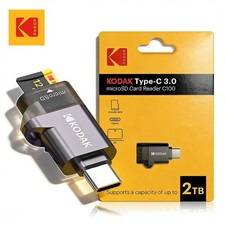
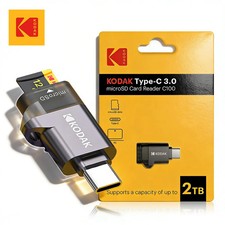
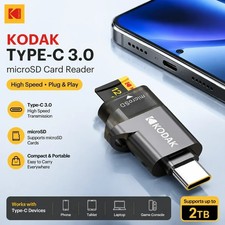
Kodak Type-C Micro SD Card Reader TF Memory Card High-speed Transmission Adapter,Kodak USB-C Micro SD Card Reader C100 High-Speed TF Memory Card Adapter🌟 Introduction
Introducing the Kodak C100 USB-C Micro SD Card Reader, a compact, convenient, and reliable memory card adapter designed to make transferring digital files easier across compatible USB-C devices. 🚀 Whether you are a professional photographer, content creator, student, business user, or everyday smartphone user, this external card reader provides a practical solution for accessing, transferring, and managing files stored on compatible TF (MicroSD) memory cards.
📱 Designed with a USB Type-C interface, the Kodak C100 helps connect supported memory cards to compatible smartphones, tablets, laptops, and other USB-C devices. Its plug-and-play operation eliminates the need to install additional drivers on supported operating systems, helping you get started quickly and conveniently.
💻 From transferring photos and videos to accessing documents and organizing digital files, this portable card reader is a useful accessory for everyday digital workflows. Its external design makes it easy to carry in a laptop bag, backpack, camera accessory case, or travel organizer.
✨ Enjoy convenient memory card access, broad device compatibility, and straightforward file management with the Kodak C100 USB-C MicroSD Card Reader.
⭐ Key Features🚀 1. High-Speed Data Transmission
Designed for convenient digital file transfers, the Kodak C100 provides a direct connection between compatible USB-C devices and supported TF memory cards.
⚡ Helps simplify photo, video, music, and document transfers.
📂 Makes it convenient to access files stored on compatible MicroSD cards.
🎥 Useful for moving digital media between supported devices.
💻 Supports memory card access for everyday productivity and file management.
🔄 Helps streamline workflows involving smartphones, tablets, and computers.
Important speed information: Actual transfer speeds depend on the memory card, the host device, the USB interface, the file types, and other system limitations. The manufacturer does not provide a specific maximum transfer speed for this model.
Although the reader supports UHS-II memory cards, its transfer performance is limited to the UHS-I standard. It does not provide the full speed potential of UHS-II cards.
🔌 2. USB Type-C Connectivity
The USB Type-C interface offers a convenient connection for compatible modern electronic devices.
📱 Compatible with supported USB-C smartphones and tablets.
💻 Suitable for compatible USB-C laptops and computers.
🍎 Works with supported Apple USB-C devices.
🤖 Suitable for compatible Android devices with the required USB host or OTG functionality.
🔗 Connects externally without requiring permanent installation.
Please note: Device compatibility depends on the USB-C port, operating system, supported file systems, and USB OTG functionality where applicable.
💾 3. TF / MicroSD Memory Card Support
The Kodak C100 is designed for TF memory cards, commonly known as MicroSD cards.
Supported card families include:
💾 MicroSD
💾 MicroSDHC
💾 MicroSDXC
These card types are commonly used in smartphones, action cameras, digital cameras, drones, portable gaming devices, and other digital equipment.
Important: Memory card capacity limits and compatibility details have not been specified for this particular model. Verify that your card is supported by both the reader and the host device before purchasing.
🖥️ 4. Plug-and-Play Convenience
Enjoy a straightforward setup process on supported devices.
✅ No additional driver installation is required on the listed supported operating systems.
🔌 No separate power supply is required.
⚙️ External installation makes the reader easy to connect and disconnect.
📂 Files can be accessed using the compatible device's file management application.
⏱️ Reduces setup complexity for everyday memory card access.
The reader is specified as compatible with Windows 11, Windows 10, Windows 8, Windows 7, Windows Vista, Mac OS X 10.2 and later, and iOS 13 and later.
Actual compatibility may vary by operating system version, device model, available applications, and hardware configuration.
🎒 5. Portable External Design
The Kodak C100 is an external accessory designed for convenient everyday use.
🧳 Easy to carry with travel and technology accessories.
🏢 Suitable for office, classroom, home, and professional environments.
📸 Useful for photographers and content creators who regularly work with memory cards.
💼 Convenient for business users handling digital documents.
🔄 Easy to connect when needed and disconnect after use.
The exact dimensions, weight, housing material, and color specifications have not been provided. Please consult the seller for these details if they are important to your purchase.
🛡️ 6. Recognized Brand and Certification
🏷️ Brand: Kodak
📋 Model: C100
🛡️ Certification: CE, as stated in the supplied product specifications.
🔋 External USB-C operation without a separate power adapter.
Certification and brand information should be understood according to the manufacturer's supplied specifications. No additional durability, waterproofing, or electrical protection rating has been specified.
📋 Technical NumberC100Product TypeExternal MicroSD / TF Card ReaderInterfaceUSB Type-CInstallationExternalCard Slot TypeTF / MicroSDSupported Card FamiliesMicroSD, MicroSDHC, MicroSDXCData TransferHigh-speed transmission; exact maximum speed not specifiedUHS-II CompatibilitySupported, with transfer speed limited to UHS-I performanceDriver InstallationNot required on listed supported operating systemsExternal Power SupplyNot requiredOperating System SupportWindows 11/10/8/7/Vista, Mac OS X 10.2+, iOS 13+ as specifiedUSB-C Mobile Device RequirementUSB OTG functionality where applicableFile System NoteFAT32 and exFAT recommended for specified Samsung, Google, and LG phonesNTFS SupportNot supported on the specified Samsung, Google, and LG phone configurationsCertificationCE, as stated by the supplierHigh-Concern ChemicalsNone declared in the supplied specificationsPackage IncludedYesProduct DimensionsNot specifiedProduct WeightNot specifiedHousing MaterialNot specifiedMaximum Supported Card CapacityNot specifiedCountry of OriginMainland China, according to the supplied specifications📏 Weight and Dimensions: US and EU Units
For accurate purchasing information, the following measurements have not been provided by the manufacturer:
⚖️ Product weight: Not specified in grams (g) or ounces (oz).
📐 Product length: Not specified in millimeters (mm), centimeters (cm), or inches (in).
📏 Product width: Not specified in millimeters (mm), centimeters (cm), or inches (in).
📏 Product thickness: Not specified in millimeters (mm), centimeters (cm), or inches (in).
No measurements have been estimated or invented. Please confirm the actual product dimensions and weight with the seller when planning storage, shipping, or accessory compatibility.
📦 Package Includes
The supplied specifications confirm that the product is packaged, but the exact quantity and contents have not been independently specified.
The expected primary product is:
Please note: A MicroSD memory card, USB-C cable, storage case, instruction manual, or additional adapter should not be assumed to be included unless explicitly listed by the seller.
📱 Where and How to Use the Kodak C100📸 1. Photography and Digital Cameras
Photographers can use compatible MicroSD cards to access and transfer stored photographs and other supported files.
How to use it:
💾 Save your photographs to a compatible MicroSD card using your camera or recording device.
🔌 Insert the card into the reader's TF card slot.
📱 Connect the reader to a compatible USB-C device.
📂 Open the device's file manager or a compatible photo application.
📤 Select and copy the files you need.
Benefits: Convenient file access, simplified transfers, and an alternative to wireless file sharing.
🎥 2. Video and Content Creation
Content creators can use the reader to access compatible video files stored on MicroSD cards.
Potential applications include:
🎬 Moving recorded clips to a laptop for editing.
📱 Importing media to compatible smartphones or tablets.
🗂️ Organizing footage into folders.
💻 Transferring supported files into editing workflows.
🔄 Copying content between compatible storage devices.
Important: Large video files may take time to transfer. Performance depends on the card's speed rating, file size, host-device interface, and application support.
📱 3. Smartphones and Tablets
For compatible USB-C smartphones and tablets, the reader provides a convenient way to access files on supported memory cards.
Possible uses include:
📷 Viewing stored photos.
🎥 Accessing compatible video files.
📄 Opening documents and other supported files.
📤 Copying files into device storage.
🗃️ Organizing digital content.
Required conditions:
Your device must support USB host access or USB OTG functionality where required.
Your operating system must recognize the reader and the memory card.
Your file manager or application must support the relevant file types and file system.
💻 4. Laptops and Desktop Computers
On compatible computers, the Kodak C100 can provide direct access to supported MicroSD cards through a USB-C port.
Useful applications include:
📁 Managing photographs and documents.
🖼️ Importing pictures into editing software.
🎬 Accessing compatible video files.
💾 Copying data between storage locations.
🗂️ Organizing backups and project files.
Before disconnecting the reader, safely eject the storage device when the operating system provides that option.
🏫 5. Education and Office Work
The reader can be useful for students, teachers, office employees, and business professionals.
Examples include:
📚 Transferring presentations and assignments.
📄 Accessing documents stored on supported memory cards.
🗃️ Organizing work-related files.
🖥️ Moving compatible media between devices.
💼 Supporting portable digital workflows.
Always follow workplace data-security policies when handling confidential or sensitive information.
✈️ 6. Travel and Everyday Use
For travelers and everyday users, the reader offers a practical method of accessing files without relying entirely on wireless transfer.
Potential uses include:
🌍 Accessing travel photographs.
🎒 Transferring supported files while away from home.
📷 Reviewing camera media on compatible devices.
💻 Working with documents while traveling.
🔋 Avoiding the need for a separate powered card reader.
The reader itself does not guarantee offline access to cloud services or provide additional storage capacity.
🎁 Key Benefits and Advantages⚡ Convenient File Transfers
A direct USB-C connection can simplify the process of moving supported files from a memory card to a compatible host device.
🔌 Simplified Connectivity
USB-C connectivity makes the reader suitable for a range of compatible modern devices, reducing the need for a separate computer with a built-in card slot.
🧩 Broad Practical Compatibility
Support for MicroSD, MicroSDHC, and MicroSDXC card families makes the reader useful across several common digital storage applications, subject to device and capacity compatibility.
🛠️ Easy Setup
No additional driver installation is required on the specified supported operating systems, helping simplify initial setup.
🔋 No Separate Power Adapter
The reader does not require an independent power supply under its specified operating conditions.
🎒 Portable Convenience
Its external format makes it convenient to carry with other everyday electronic accessories.
💼 Flexible Everyday Applications
From personal photography to document management, the reader supports a variety of file-access and transfer tasks.
Please remember: These benefits depend on compatibility with the host device, memory card, operating system, and file system. Actual performance may vary.
⚠️ Important Compatibility Notes📱 USB-C Smartphones and Tablets
USB-C connectivity alone does not guarantee that every smartphone or tablet will support external card readers.
Before purchasing, confirm that your device supports USB OTG or USB host functionality where necessary.
💾 Memory Card Formatting
The supplied specifications identify FAT32 and exFAT as supported file-system choices for the specified Samsung, Google, and LG phone configurations.
NTFS is not supported in those stated configurations.
✅ FAT32: Commonly used for broad compatibility, with a maximum individual file size of 4 GB.
✅ exFAT: Generally suitable for larger files and compatible modern devices.
⚠️ NTFS: Not supported on the specified phone compatibility varies by device and operating system. Other devices may have different requirements.
Warning: Formatting a memory card erases its existing contents. Back up important files before formatting.
⚡ UHS-I and UHS-II Transfer SpeedsThe reader supports UHS-II cards but is limited to UHS-I transfer performance.
This means:
💾 A UHS-II card can be used when otherwise compatible.
⚡ Its higher UHS-II speed potential will not be fully utilized.
🔄 Actual transfer speeds depend on the reader, card, host device, and workload.
Do not purchase this reader solely to achieve the maximum possible UHS-II performance.
🔌 Connector UsageThe supplied product information states that USB-A and USB-C plugs cannot be connected at the same time.
Use the appropriate connector configuration for your device, and do not force incompatible connections.
🛡️ Important Safety and Usage PrecautionsTo help protect your files and maintain reliable operation, follow these recommendations.
🔌 Check compatibility first. Verify the host device's USB-C and OTG requirements before use.
💾 Use a compatible memory card. Confirm the card type and capacity requirements for both the reader and host device.
📂 Back up important files. Keep a separate copy of valuable photographs, documents, and videos.
⏏️ Disconnect safely. Eject the card or reader through the operating system when possible before removal.
🚫 Avoid forced insertion. Never force the memory card or connector into the reader.
💧 Keep it dry. No waterproof or water-resistance rating has been specified.
🌡️ Avoid extreme conditions. Keep the device away from excessive heat, moisture, and direct exposure to harsh environments.
🔄 Avoid interruptions during transfers. Disconnecting during active file operations can cause incomplete copies or data corruption.
🔐 Protect sensitive information. Use appropriate security procedures when transferring confidential files.
🧹 Keep connectors clean. Prevent dust and debris from accumulating around the USB-C connector and card slot.
💻 Check operating-system recognition. If the reader is not detected, check the connection, card format, file manager, and device compatibility.
📋 Verify package contents. Confirm included accessories with the seller before placing your order.
🔍 Troubleshooting Guide❓ The reader is not recognizedTry the following:
🔌 Disconnect and reconnect the reader.
📱 Confirm that your smartphone or tablet supports USB OTG where required.
💾 Check whether the memory card is properly inserted.
💻 Try another compatible USB-C port or host device.
🔄 Restart the device if necessary.
❓ The memory card appears empty or cannot be opened📂 Open the appropriate file manager or storage application.
💾 Check whether the card uses a compatible file system.
🔐 Verify that the files are not corrupted or stored in an unsupported format.
💻 Test the card in another compatible device if available.
Avoid formatting the card until you have checked whether it contains important data.
❓ File transfers are slower than expected⚡ Check the memory card's speed rating.
🔌 Confirm that the host device and connection are operating correctly.
💾 Remember that UHS-II cards are limited to UHS-I performance in this reader.
🎥 Consider the size and number of files being transferred.
🔄 Avoid running unnecessary intensive operations during transfers.
❓ A Samsung, Google, or LG phone cannot read the card💾 Check whether the card is formatted as FAT32 or exFAT.
⚠️ NTFS is not supported on the specified phone configurations.
📱 Verify that the phone supports external USB storage and the required OTG functionality.
Back up all important data before changing a memory card's format.
💎 Why Buy the Kodak C100 USB-C Card Reader?Choose the Kodak C100 if you want a practical external adapter for accessing compatible MicroSD cards through supported USB-C devices.
🌟 Reasons to Consider This Product🔌 USB-C connectivity: Designed for compatible modern devices.
💾 Common MicroSD card support: Works with supported MicroSD, MicroSDHC, and MicroSDXC cards.
⚡ Convenient file access: Helps simplify everyday digital transfers.
🛠️ Driver-free setup: No additional drivers are required on the specified supported systems.
🔋 No separate power supply: Convenient for mobile and desktop workflows.
🎒 External portability: Easy to carry with other technology accessories.
💻 Multiple applications: Suitable for supported photo, video, document, and general file-management tasks.
🏷️ Kodak branding: A recognizable brand name in digital imaging and photography accessories.
🎯 Who Is This Product For?This card reader may be a suitable choice for:
📸 Amateur and professional photographers.
🎬 Video creators and digital content producers.
📱 Smartphone and tablet users with compatible USB-C ports.
💻 Laptop and computer users who need MicroSD access.
🏫 Students and educators transferring digital files.
💼 Professionals managing documents and media.
✈️ Travelers who want a convenient way to access supported memory cards.
📌 Key Bullet Points🔌 USB Type-C external MicroSD / TF card reader.
🏷️ Kodak C100 model.
💾 Supports MicroSD, MicroSDHC, and MicroSDXC card families.
⚡ Designed for high-speed data transmission; exact maximum speed is not specified.
🔄 Supports UHS-II cards at UHS-I transfer performance.
🛠️ No additional driver required on the specified supported operating systems.
🔋 No separate power supply required.
📱 Requires USB OTG functionality on compatible mobile devices where applicable.
💻 Supports the specified Windows, Mac OS X, and iOS versions, subject to device compatibility.
📂 FAT32 and exFAT are recommended for the specified Samsung, Google, and LG phone configurations.
⚠️ NTFS is not supported on those specified phone configurations.
🛡️ CE certification is stated in the supplied specifications.
📏 Product weight and dimensions have not been provided.
📦 Confirm the exact package contents with the seller.
🛒 Final Product SummaryThe Kodak C100 USB-C MicroSD Card Reader is an external memory card adapter designed to make accessing and transferring supported digital files more convenient. Its USB-C interface, compatibility with common TF memory card families, driver-free operation on specified systems, and lack of a separate power requirement make it a useful accessory for compatible smartphones, tablets, laptops, and computers.
Whether you are organizing photographs, accessing recorded videos, transferring documents, or managing everyday digital files, the Kodak C100 offers a straightforward way to connect supported MicroSD storage to compatible devices.
🌟 Choose a convenient, practical solution for your everyday memory card access and file-transfer needs with the Kodak C100 USB-C Card Reader. 🌟
📣 Before You OrderPlease verify your device's USB-C and OTG compatibility, confirm your memory card's format, and review the package contents. Product dimensions, weight, maximum supported card capacity, and a guaranteed transfer-speed figure were not provided in the supplied specifications and should be confirmed with the seller if