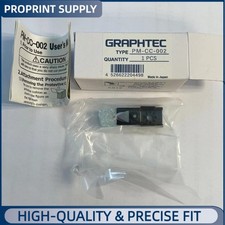
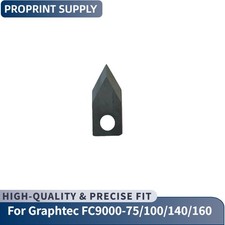
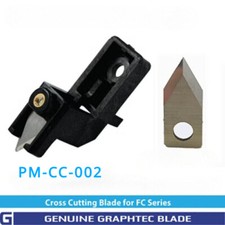
Original Graphtec PM-CC-002 Cross Cutting Knife Last Cut for FC9000-75/100/140/160 Plotter 🛠️ GRAPHTEC PM-CC-002 CROSS CUTTING KNIFE | 100% NEW ORIGINAL | FC9000 SERIES FULLY COMPATIBLE 🔧 Quick Blade Replacement Steps
- Unscrew the fixing screws on the knife bracket and take out the bracket
- Use a Phillips screwdriver to remove the screws that fix the blade
- Replace with the new PM-CC-002 cross cutting knife and reinstall in reverse order
Item Name : Graphtec Cross Cutting Knife / Last Cut Knife
Part Number : PM-CC-002
Core Function : Precise Cross Cutting of Materials, Clean Cut Edges Without Burrs
Applicable Machines : Graphtec FC9000-75/100/140/160 Cutting Plotters
Product Grade : New Original OEM Component
⚠️ Important Installation & Purchase Notes
- This cross cutting knife is exclusively for Graphtec FC9000 series plotters (75/100/140/160 models), confirm your machine model before purchase
- Wear protective gloves during replacement to avoid being cut by the sharp blade
- Power off the plotter and unplug the power cord completely before disassembly and installation
- Ensure the blade is fixed firmly after installation to prevent falling off during high-speed operation
🌟 Core Advantages
- 100% original Graphtec accessory, perfect fit with FC9000 series knife brackets without assembly gaps
- High-hardness alloy blade, sharp and durable, maintains cutting performance after long-term use
- Precise blade angle design, ensures clean and smooth cross cut edges, no material burrs or tearing
- Simple replacement process, no professional tools required except a Phillips screwdriver
- Compatible with multiple FC9000 models, one knife for multiple machines, reduces inventory costs
Original Graphtec PM-CC-002 Cross Cutting Knife Last Cut for FC9000-75 FC9000-100 FC9000-140 FC9000-160 Plotter
The Original Graphtec PM-CC-002 Cross Cutting Knife is a dedicated last-cut component for FC9000-75/100/140/160 high-performance cutting plotters. Crafted from high-hardness alloy material, it features a precision-ground cutting edge that delivers clean, burr-free cross cuts on a variety of materials including vinyl, sticker paper, and film. Designed for easy replacement with just a Phillips screwdriver, it eliminates the hassle of professional maintenance and reduces machine downtime. As an OEM accessory, it ensures seamless compatibility with FC9000 series plotters, avoiding the uneven cuts and material waste caused by generic replacement blades. This knife is an essential part for maintaining the high-precision cutting performance of your Graphtec plotter.
🔧 Product Specifications
Material: High-hardness Wear-resistant Alloy Steel
Design: Precision Ground Cutting Edge, Quick-release Fixing Structure
Replacement Tool: Phillips Screwdriver (Standard Size)
Function: High-precision Material Cross Cutting, Last Cut Finishing
🔌 Exclusive Compatible Graphtec Plotter Models
- FC9000-75
- FC9000-100
- FC9000-140
- FC9000-160
💡 Please confirm your plotter's exact model before placing an order!
📊 Original Graphtec PM-CC-002 vs Generic Cross Cutting Knife FeatureOriginal Graphtec KnifeGeneric KnifeCompatibilityPerfect Fit for FC9000 Series BracketsSize Mismatch, Loose InstallationCutting PerformanceSharp & Clean Edges, No BurrsBlunt Blade, Uneven & Torn CutsDurabilityWear-resistant, Long Service LifeEasy Dulling, Frequent ReplacementSafetySecure Fixation, No Falling RiskEasy Loosening, Potential Safety Hazard 📦 Package Contents
- ✔ 1 x New Original Graphtec PM-CC-002 Cross Cutting Knife
🔧 Detailed Installation & Replacement Guide
⚠️ Power off the plotter & unplug power cord completely before any operation! Wear protective gloves!
- Open the plotter's side cover and locate the cross cutting knife bracket at the material output end
- Use a screwdriver to unscrew the 2 fixing screws on the bracket, then gently take out the entire bracket assembly
- On the bracket, find the 1 fixing screw that secures the old blade, remove it with a Phillips screwdriver and take out the old knife
- Align the new PM-CC-002 knife with the bracket slot, ensure the orientation is correct, then reinstall and tighten the fixing screw
- Put the bracket assembly back into the original position, tighten the bracket fixing screws, and close the side cover
- Power on the plotter and run a test cross cut to verify the cutting effect
💡 Do not touch the blade edge directly with your hands, and do not over-tighten the screws to avoid damaging the bracket!
📌 Maintenance Tips
- ⚠️ Do not use the knife to cut hard materials such as metal sheets to avoid blade chipping
- ✅ Clean the blade surface with a dry cloth after each use to remove material residue
- ✅ Replace the knife in time when the cutting edge becomes dull or chipped to ensure cutting quality
- ✅ Store spare knives in a sealed box, away from moisture and direct sunlight to prevent rust
🏢 Bulk Orders
- Volume discounts available from 15 pieces
- Protective packaging to prevent blade damage during transportation
- Custom labeling service for orders over 50 pieces
- Combine with other Graphtec plotter parts for extra discounts
Graphtec PM-CC-002 Cross Cutting Knife | FC9000 Series Compatible | Precise & Clean Cuts
🛠️
Original OEM Part ✅
Sharp & Durable 🔧
Easy Replacement