Project Management Tracker - Notion workspace + billing spreadsheet
For solo consultants and small agencies running several client projects or retainers at once.
⚡ Instant electronic delivery🧩 Notion + Excel / Google Sheets📘 8-page PDF setup guide♾️ One-time - no subscription
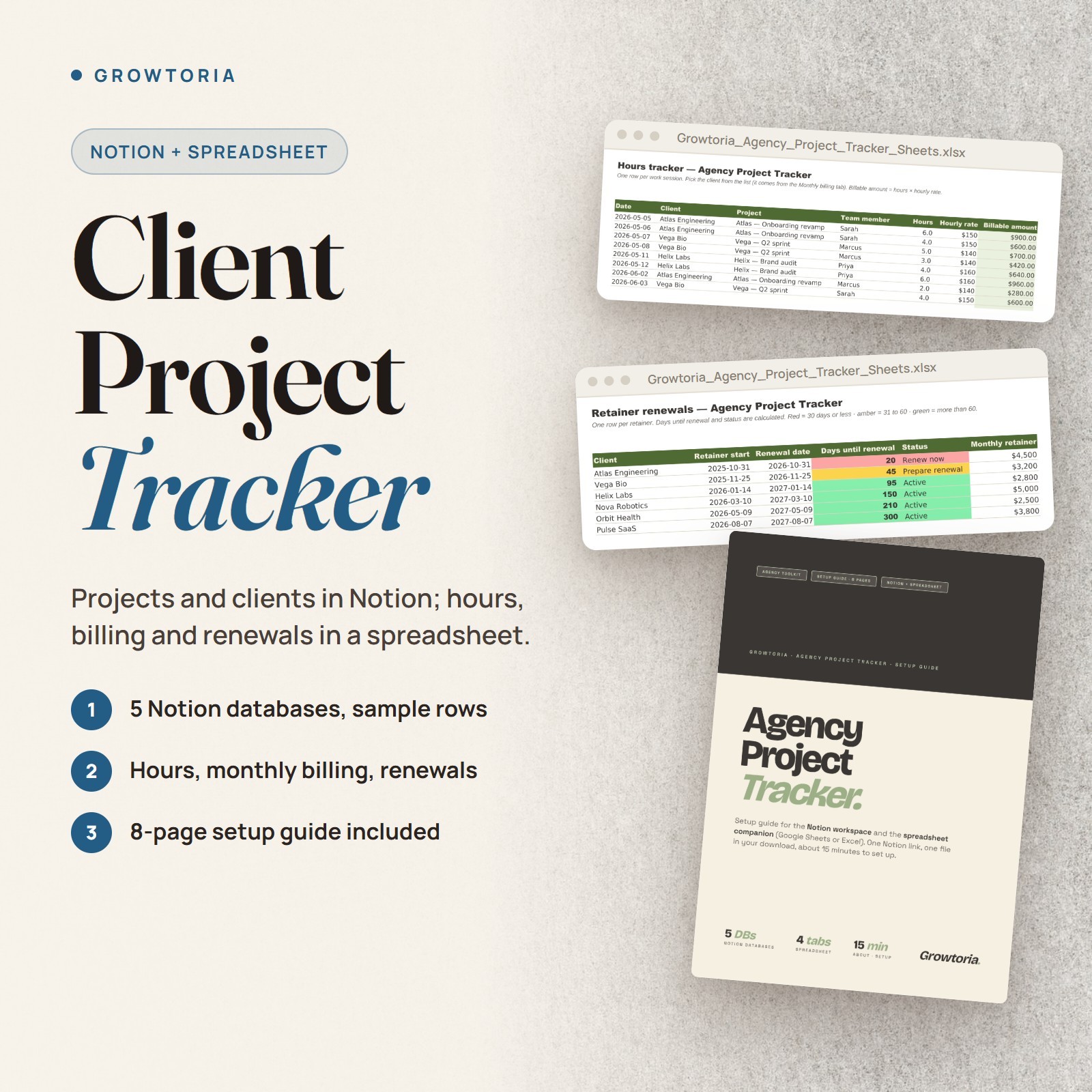
This project management tracker combines a Notion workspace for day-to-day client work with a spreadsheet (.xlsx for Excel or Google Sheets) for hours, monthly billing and retainer renewals. It is built for solo consultants and small agencies juggling several client projects or retainers. You receive the .xlsx file and an 8-page PDF setup guide that contains the Notion template link.
What you can do🗂️5 Notion DatabasesProjects, Clients, Deliverables, Meetings and Pipeline, each with sample rows - separate tables you can link with Notion relations later.⏱️Hours TrackerOne row per work session with billable amount = hours x rate, and room for 1,000 rows.🧾Monthly BillingBillable amount per client and per month over 12 months, pulled from the hours log and ready to export to CSV for your accountant.🔁Retainer RenewalsDays until renewal and status for up to 50 retainers, color-coded for 30 days or less, 31 to 60, and more than 60.How it works
- Open the files Open the spreadsheet in Excel, or upload it to Google Drive and save it as a Google Sheet, then read the 8-page setup guide (PDF).
- Duplicate the Notion workspace Use the Notion template link in the guide - setup takes about 15 minutes in total.
- Run your week Use Notion for the day-to-day and the spreadsheet for monthly billing and renewals; the guide suggests a 10-minute daily routine.
What's included
- ✔️ 1 Excel workbook (.xlsx) - hours tracker, monthly billing, retainer renewals and a Start here tab; opens in Excel or Google Sheets
- ✔️ 8-page setup guide (PDF) with the Notion template link
- ✔️ Notion workspace with 5 databases and sample rows, duplicated from the link in the guide
Why customers choose it💸Hours get billedEvery work session lands in the hours log and flows into monthly billing, so time is less likely to go unbilled.📅Renewals on your radarColor-coded days-until-renewal show which retainers come up next.🆓No paid automation toolNotion and the spreadsheet stay independent, and the guide shows how to link them by hand.Buy with confidence
Instant electronic delivery • One-time purchase • Friendly support — just message us on .Quick answersWhat software do I need?
Microsoft Excel or Google Sheets for the .xlsx file, a free Notion account to duplicate the workspace, and a PDF reader for the guide.How is it delivered?
Delivered electronically right after purchase through messages - nothing is shipped. You receive the .xlsx spreadsheet and the PDF setup guide; the Notion template link is inside the guide.Is it ready to use?
Yes - the formulas are built in. Delete the sample rows, enter your own clients and hours, and the totals calculate automatically.Are Notion and the spreadsheet connected?
No. They stay independent, so no paid automation tool is needed; the guide shows how to link them by hand.Is it accounting software?
No. It is a planning and record-keeping tracker for hours, billing and renewals - not tax or financial advice.More from our storePair it with Agency Client Onboarding Kit to start engagements right and Agency Pricing Playbook to price them.Instant electronic delivery - track the work, bill the hours, catch the renewals.License & buyer notice
This is an electronically delivered product — nothing is shipped. The buyer is only receiving a revocable license with specific limitations: one user, for personal or internal business use; the files may not be resold, shared or redistributed. Electronically delivered goods do not qualify for the Money Back Guarantee. What you need: A free Notion account to duplicate the workspace and Microsoft Excel or Google Sheets for the spreadsheet; the setup guide is a PDF. If anything is not right, message us on and we will fix it.