When you click on links to various merchants on this site and make a purchase, this can result in this site earning a commission. Affiliate programs and affiliations include, but are not limited to, the eBay Partner Network. When you click on links to various merchants on this site and make a purchase, this can result in this site earning a commission. Affiliate programs and affiliations include, but are not limited to, the eBay Partner Network.
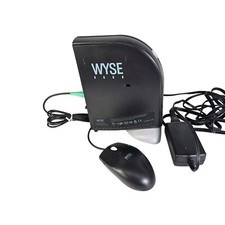
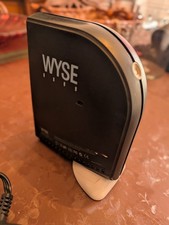
Used. Good working condition with AC power supply.Small bit of residue on the right panel from a sticker. Easily cleaned.Sold as is.The WYSE WINTERM 5150SE THIN CLIENT x150SE / 902087-21 is a thin client device produced by the brand Wyse. Specifically designed for enterprise networking, this model offers a secure and efficient computing experience by offloading processing tasks to a central server. With its compact design and reliable performance, the WYSE WINTERM 5150SE THIN CLIENT is ideal for organizations looking to enhance their productivity and streamline their IT infrastructure. The Wyse Winterm 5150SE (Part Number: 902087-21, alternative designation x150SE) is a legacy enterprise thin-client terminal manufactured by Wyse Technology before its acquisition by Dell.⚙️ Core Technical SpecificationsThis device was specifically built as a "stateless" plug-and-play terminal designed to run decentralized virtual environments, cloud hosting, or legacy server infrastructures. - Processor: AMD Geode GX 533 @ 1.1W processor.
- Operating System: Powered natively by Wyse Linux V6 (built on Linux Kernel 2.6) featuring a built-in Mozilla Firefox 1.0 browser.
- Architecture: Fanless, convection-cooled design with zero moving parts. It contains no physical hard drives, CD-ROM drives, or cooling fans to minimize maintenance and power draw.
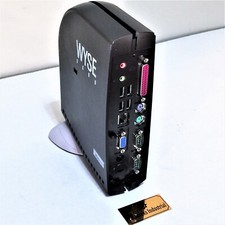
🔌 Connectivity & Legacy PortsThe 5150SE acts as a heavy I/O legacy workstation hub featuring: - USB Ports: 4 x USB 2.0 ports.
- Legacy Input: 2 x PS/2 ports (for classic keyboards/mice).
- Serial/Parallel: 2 x Serial (RS-232) ports and 1 x Parallel port.
- Networking: 1 x 10/100 Base-T Fast Ethernet RJ-45 WAN port.
- Video: Built-in high-speed integrated video (usually outputting via a DVI-I or VGA adapter depending on the backplate configuration).
💻 System Compatibility & Administration - Supported Protocols: Native support for RDP 5.1, Citrix ICA 8.0, Native X Windows, terminal emulations (TN3270, TN5250), and text emulations.
- Admin Access: If you are trying to configure the machine, pressing Ctrl + Esc during bootup opens the local administrator layout screen. This environment allows you to configure central remote server URLs, adjust network parameters, change keyboard regional layouts, or execute factory resets.
 |
|